

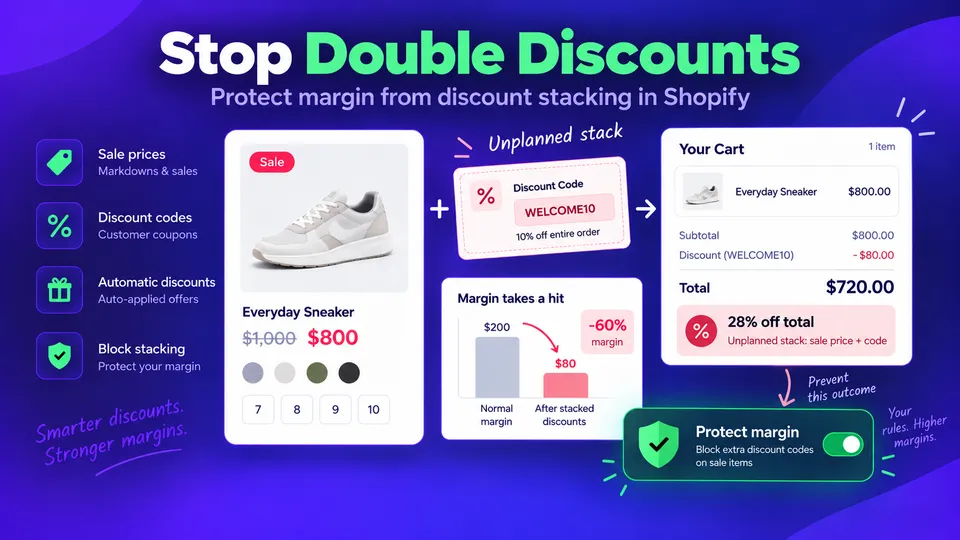
You put a product on sale at 20% off. A customer adds it to the cart, types in the 10% welcome code from your popup, and pays 28% less than the regular price. Nothing is broken. That is simply what Shopify does when a code meets a sale price, and during a sale weekend it happens on a large share of orders.
Why codes stack on sale prices
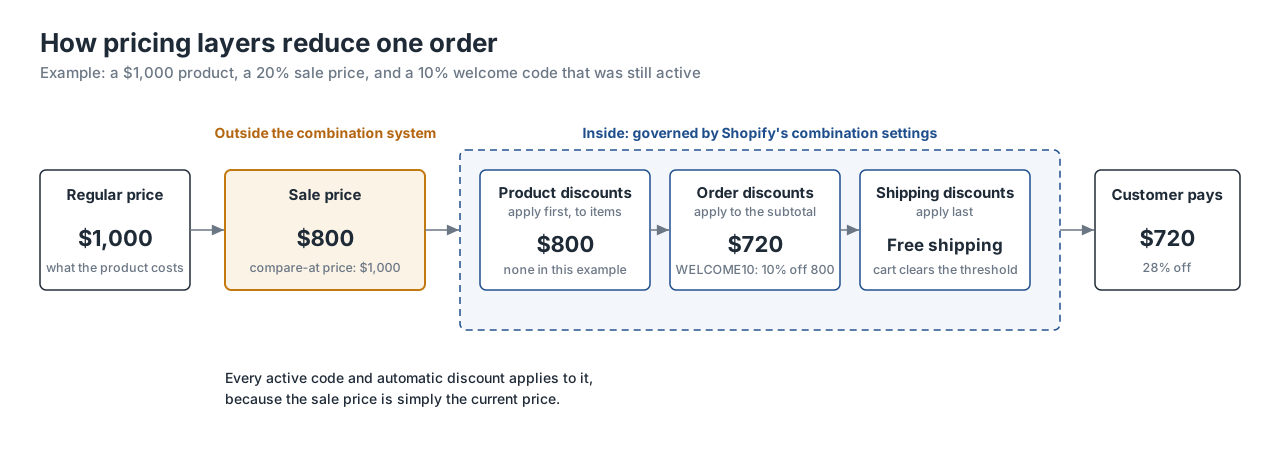
A sale price is not a discount. When you lower Price and put the original in Compare-at price, whether by hand or with an app, Shopify sees a product that costs $800. It has no record that it used to cost $1,000.
Shopify's discount combination settings only govern how discounts combine with each other: product, order, and shipping discounts, codes and automatic ones. A sale price sits outside that system, so those settings can't stop a code from applying to it. Any code the customer is eligible for, welcome, abandoned-cart, loyalty, influencer, affiliate, takes its percentage off the already-reduced price.
Block discount codes on sale items with Disco
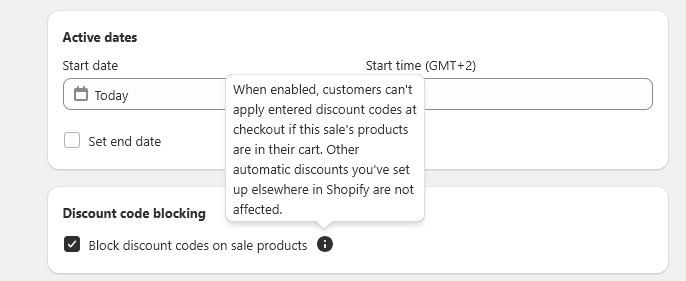
If the sale price should be the floor, turn on one setting in the Disco campaign: Block discount codes on sale products, on the Business plan.
- Open the campaign in Disco (or create one: pick the products by collection, tag, type, or vendor, set the discount and the start and end times).
- Under Discount code blocking, tick Block discount codes on sale products.
- Save. The block is active for as long as the campaign is live, and switches off when the campaign ends and prices are restored.
What happens at checkout:
- The campaign puts the products on sale.
- A customer adds a sale product to the cart.
- The customer enters a discount code at checkout.
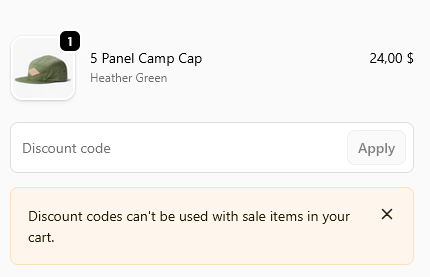
- Shopify rejects it. The customer sees: "Discount codes can't be used with sale items in your cart."
The block applies to the whole cart
One sale item in the cart blocks discount codes for the entire order, including full-price items sitting next to it. That is usually what you want during a sale: the code was meant for full-price shopping, and the customer already has the sale. If you'd rather full-price items stay code-eligible, the alternative is to keep those products out of the campaign.
Test it before the sale
Some third-party discount apps create codes Shopify can't reject, and those may still go through. Before launch, place test orders on the live store with:
- a Shopify-native discount code,
- a code created by any other discount app you use,
- a cart with only sale items,
- a cart mixing sale and regular-price items.
Record the expected and actual totals. If an app-created code slips through, pause that code for the sale window in the app that created it.
Turning the block off
Either untick Block discount codes on sale products in the campaign, or end the campaign. Codes work again immediately.
When you'd rather let a code through
Blocking isn't always the answer. One situations where you could leave the toggle off:
- A planned extra for loyalty members. If members are promised 5% on top of everything, price it into the sale depth (a 25% sale plus 5% is what a 30% sale costs you) and let the code apply.
FAQ
Does Shopify stop discount codes from applying to sale items on its own?
No. Discount combination settings control how discounts combine with each other. A sale price is a product price, not a discount, so any eligible code applies on top of it unless something blocks the code.
Does the block also stop automatic discounts?
No. It blocks codes the customer enters at checkout. Automatic discounts you've set up elsewhere in Shopify are not affected, so pause those for the sale window if they shouldn't apply. Codes created by apps that make them non-rejectable may also get through; test them.
Can I block codes on some sale products but not others?
The block is set per campaign and applies to the whole cart as soon as one blocked-campaign product is in it. To leave some products code-eligible, run them in a separate campaign without the block, or leave them out of the sale.
Stop Shopify from stacking discount codes on top of your sale prices
Decide before the sale whether codes may stack, run the numbers on your headline products, and if the sale price is the floor, enable the block in the campaign and test it with a real code.
Turn on "Block discount codes on sale products" in your next Disco campaign and place one test order with your welcome code. Discount code blocking is on the Business plan (compare plans).
Install Disco from the Shopify App Store →
Next: How to show sale prices on Shopify product pages before checkout explains the two mechanisms a code can stack on, and The 2026 BFCM playbook: plan your biggest sale months ahead puts the codes policy from this guide into a full season plan.