

Most flash sales on Shopify are launched the same way. Someone lowers a few hundred prices, sends an email, and hopes. Two days later, someone raises the prices again. Ideally the right ones, ideally at the right time.
That treats a flash sale as a price change. The sales that move the needle treat it as a launch: a run-up where customers learn it's coming, a live window where every touchpoint points at the same offer, and a clean ending where the deadline is honored and the store returns to normal without anyone staying up until midnight.
This guide walks through that sequence and ends with a day-by-day timeline you can copy. Each step notes what Shopify can do on its own and where automation pays off. We built Disco for exactly this sequence, so it's the app in the examples.
A flash sale has three phases
Before touching a single price, name the three states your store will be in.
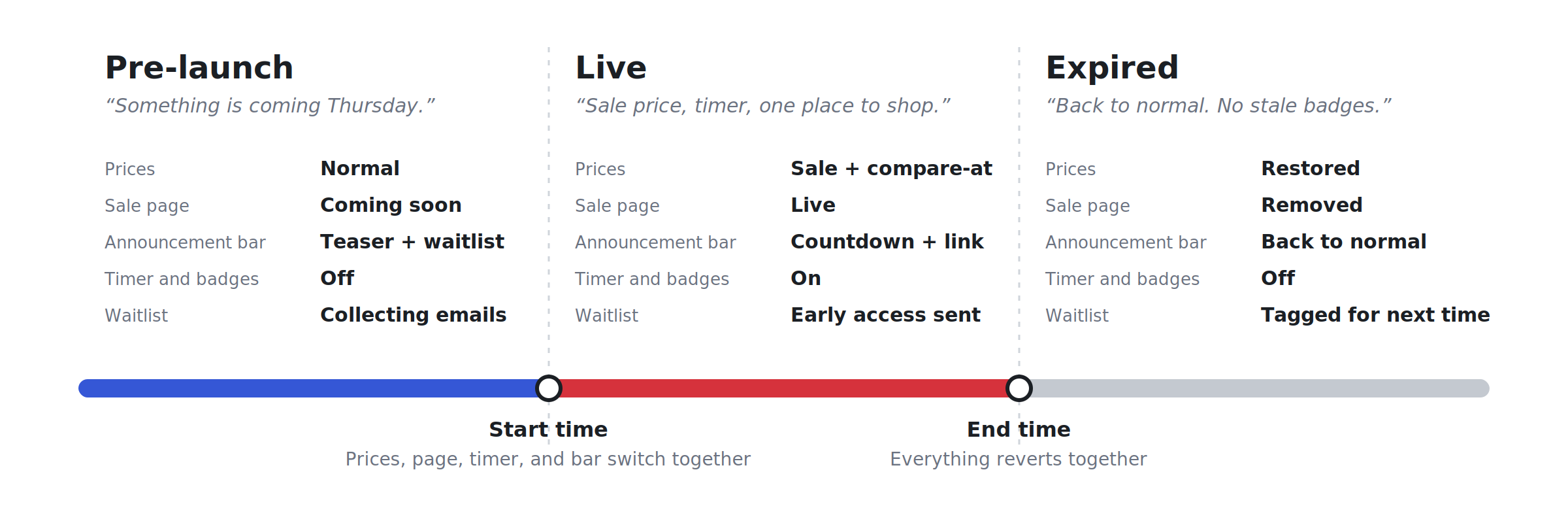
| Phase | What the customer sees | What has to happen in the store |
|---|---|---|
| Pre-launch | "Something is coming Thursday. Want early access?" | Coming-soon page live, announcement bar teasing the date, waitlist capturing emails, prices still normal |
| Live | Sale prices with the original struck through, a timer, a badge, and one obvious place to shop | Prices switched, sale page published, sale collection populated, announcement bar updated, discount-code rules decided |
| Expired | Normal prices, no timer, no stale "SALE" badges | Prices reset, sale page removed, widgets off, waitlist segment ready for next time |
The price change is one item in that table. The rest is timing, and the two transitions (normal → live, live → normal) are where flash sales go wrong: a timer still counting after prices reset, a "SALE" badge on a product back at full price, a coming-soon page still in the menu on launch day. Those aren't pricing mistakes. They're sequencing mistakes.
Pre-launch: build a coming-soon destination
A teaser only works if it has somewhere to send people: a single page that says what's coming, when, and why someone should hand over their email.
Say three things. The when (date and start time, in your customers' time zone), the what (which collection, roughly how deep the discount goes), and the why join (early access, first pick before popular sizes sell out). You don't have to reveal exact prices. "Up to 40% off the autumn collection, Thursday at 8 PM" is specific enough to be credible and vague enough to keep the launch interesting.
Tease heroes, not leftovers. Three to six bestsellers people already want. Clearance items sell on the strength of the sale; the heroes are what make people sign up.
Keep the form to one field. Email only, a line on what they'll get ("one email when it goes live, one before it ends"), and a confirmation that they're on the list.
In Shopify: create a page, add your theme's newsletter section, and remember to hide or swap it at launch. In Disco: the flash-sale page has a coming-soon state that runs before the campaign, and every email it collects lands in your Shopify customer list with campaign tags, ready to use in Shopify Email, Klaviyo, or whatever you already send from. At the start time, the live sale page publishes on its own. Setup is in the flash-sale page help doc.
Announcement bar before launch
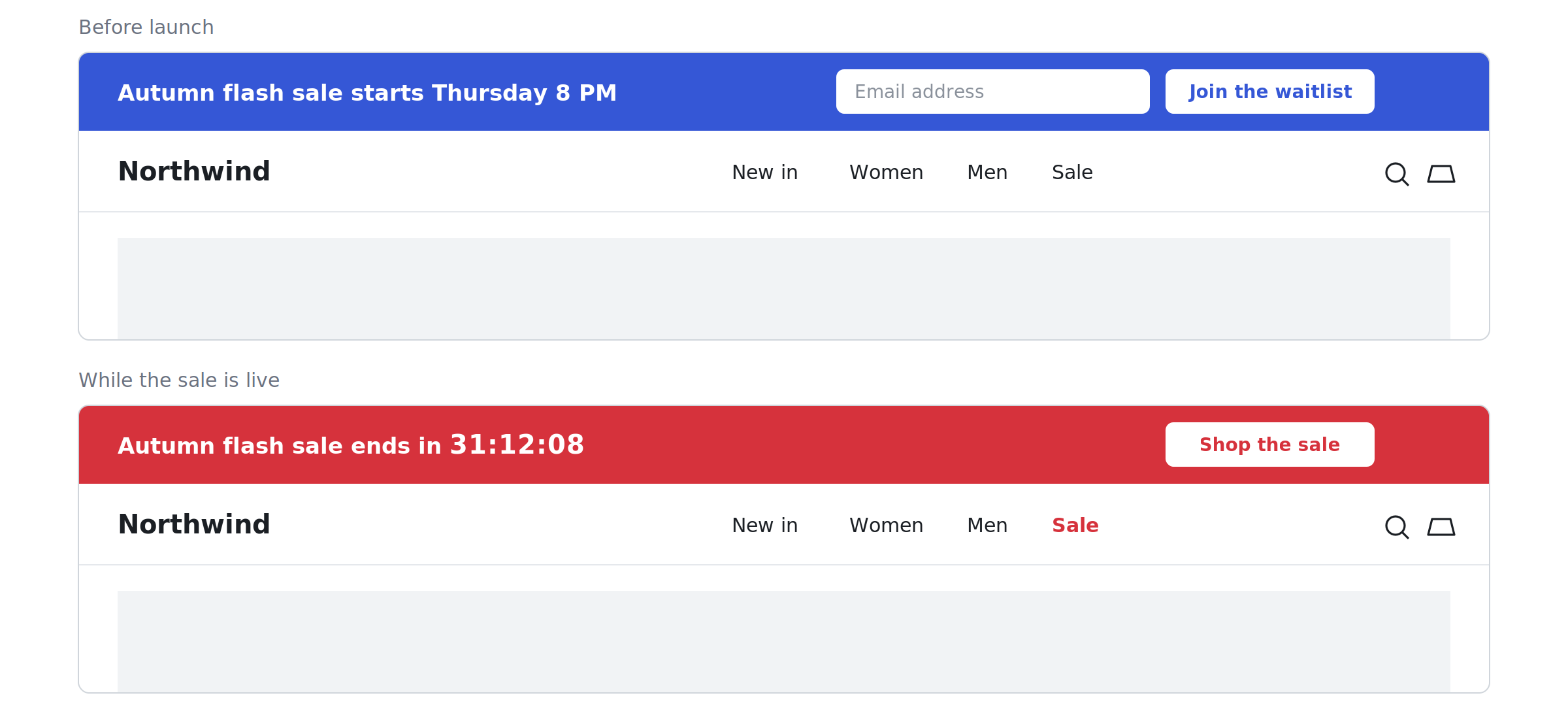
The page is the destination; the bar is the signpost every visitor sees, whichever page they land on. That's why it needs discipline: one message, one date, one action. Autumn flash sale starts Thursday 8 PM → Join the waitlist. Not "Free shipping over $50 | New arrivals | Sale coming Thursday | Follow us." If the bar already carries a free-shipping message, decide which matters more for the next seven days. Date first, offer second, action last.
In Shopify: most themes have an announcement bar section that can link to your page; you edit it by hand at launch and again at the end. In Disco: the announcement bar follows the campaign dates and can capture emails right in the bar, so a visitor on any product page can join the waitlist without leaving. Set the pre-launch message to collect emails and the live message to point at the sale; both switch off with the campaign. Widget availability varies by plan, so check the current plans.
Launch: switch the destination to the sale page
Launch should be one coordinated switch, not six manual edits. At the start time, four things need to be true at once:
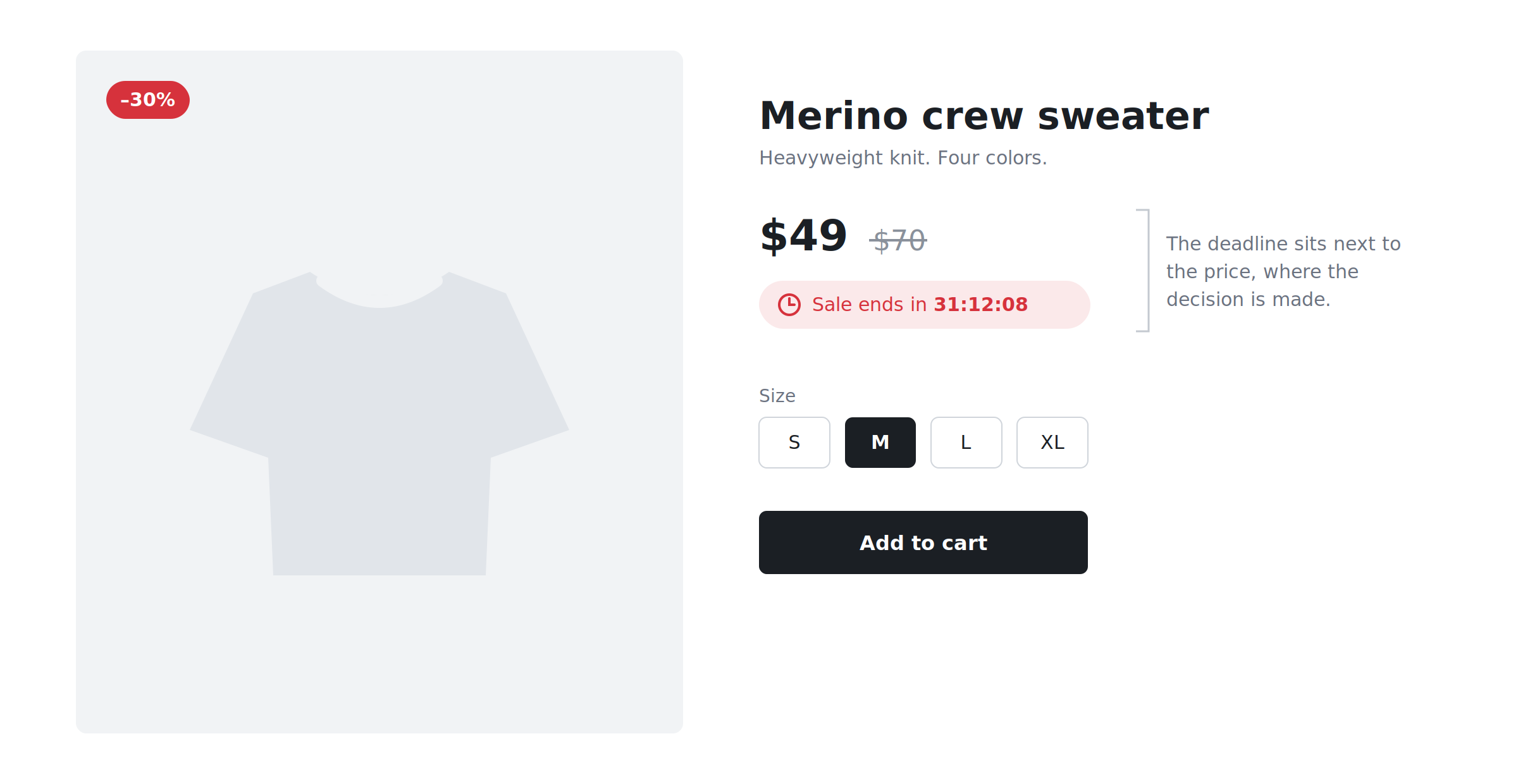
- Prices are switched. Each sale product shows the new price with the original as the compare-at price, so the saving is visible on the product and collection page, not just at checkout. If that distinction is new, Shopify sales vs. discount codes explains it.
- The sale page is live, ideally at the same URL you've been sending people to all week.
- Navigation points to it. A "Sale" item in the menu, the homepage hero, the announcement bar link. One click from anywhere.
- Discount-code rules are decided. A 10% welcome code on top of a 30% sale price means the sale price was never your floor. Decide whether codes stack, and if not, block them for the window. The discount stacking article has the math.
In Shopify: bulk-edit prices and compare-at prices (or import a CSV), publish the page, edit the menu, update the bar, all at the same moment. Fine for a small catalog during working hours. Hard at 8 PM on a Thursday with 400 variants. In Disco: the campaign carries the start time, the product selection (by collection, tag, vendor, or type, with exclusions), the discount, and the widgets. At the start time it writes the prices, publishes the page, turns on the timer, badges, and bar, and can auto-tag the sale products so a collection picks them up. The scheduling guide covers what happens at each moment.
Test it first. Run a one-product campaign that starts ten minutes from now. Watch the price change, the compare-at price appear, the page publish, the badge show. Let it end and confirm everything reverts. Ten minutes of testing beats a support ticket at 8:07 PM.
Countdown timer and badges
Urgency is why a flash sale outperforms a regular sale. It's also the easiest place to lose trust.
Put the timer where the decision happens: on the sale page, on product pages near the price, and in the announcement bar so it follows the visitor. The customer who clicks through from the homepage should see the same deadline where they add to cart.
Make the deadline real. The timer must count down to the actual campaign end, the same moment prices reset. Timers that restart on every visit and sales "extended by popular demand" every time teach customers that your deadlines are decoration (and can count as a misleading practice in some markets). The safeguard: timer, price change, and page state driven by one end time. Separate settings maintained by hand drift.
Badges make sale products findable in a mixed collection and reinforce the compare-at price. Keep them consistent with the actual discount (no "up to 50%" on a product that's 20% off) and make sure they disappear when the campaign ends. A stale sale badge on a full-price product is the most visible post-sale mistake there is. In Disco, the timer and badges are tied to the campaign's start and end, which is what keeps them honest; the timer is on the free plan, badges on paid tiers (current plans).
Use the sale collection as the channel hub
Every channel during the live window needs one link, and it should be the sale collection: the URL stays the same from campaign to campaign, products and badges are right there, customers can filter by size without leaving, and when the sale ends the URL can carry a "next sale" waitlist rather than a dead end.
Keep it populated automatically. The failure mode is a collection missing the products you added last-minute. The fix: Disco auto-tags every product in the campaign, and a Shopify automated collection with the condition "product tag is equal to flash-sale" picks them up the moment they're tagged and drops them when the tag goes. Setup is in the sale-collection article and the auto-tagging help doc.
| Channel | Message | Link |
|---|---|---|
| Email, waitlist first | "You're in. The sale is live for 48 hours." At the start time, 10 minutes before the general blast. | Sale collection |
| Email, everyone | "Autumn flash sale: 48 hours, up to 40% off." | Sale collection |
| Paid social | Hero product, the discount, the deadline. Nothing else. | Sale collection |
| Organic social / stories | Countdown sticker matching the real end time; link in bio. | Sale collection |
| Homepage hero | Same headline as the email; timer if your theme supports one. | Sale collection |
Give the waitlist a real head start: their email at the start time, the general blast ten minutes later. Never send "live now" before prices have switched. That's the first broken promise of the sale.
After the deadline
This is where the promise is kept. Whoever bought at 7:50 PM needs to see the sale really ended at 8; whoever arrives at 8:10 PM needs normal prices and no timer.
Stop the campaign. Prices revert, compare-at prices clear, badges and timer disappear, the sale page unpublishes or switches to an ended state, the bar returns to normal. In Disco that's the scheduled end time doing its job. In Shopify it's the launch edits again, in reverse.
Check within the hour: three sale products back to normal price; the sale collection empty or as intended; the sale URL not showing a live timer; the announcement bar and homepage hero; any blocked discount codes active again if they should be; and, if you use a feed, marketplace, or price-sync app, that it hasn't re-applied stale prices (help doc).
Don't leave a dead URL. Point it to a "sale has ended, join the list for the next one" page, redirect it to bestsellers, or let it become the next coming-soon page. The waitlist is now a tagged segment in Shopify, the best starting point for the next launch.
Mini example: a 48-hour flash sale, from first teaser to close
Autumn flash sale, live from Thursday 8 PM to Saturday 8 PM. Adjust the dates and discount; keep the shape.
| When | What happens | Message |
|---|---|---|
| Thursday, one week before | Campaign built and scheduled: products by collection with exclusions, 30% off, Thu 8 PM to Sat 8 PM, discount codes blocked. One-product test run and reverted. | — |
| Saturday, 5 days before | Coming-soon page goes live. Announcement bar switches to the teaser. First organic post. | "Autumn flash sale: Thursday 8 PM. Join the waitlist for early access." |
| Monday, 3 days before | Email to the full list. Paid social teaser starts. | "Three days. Up to 40% off the autumn collection. The list gets in first." |
| Wednesday, the day before | Reminder to non-openers. Story with a countdown sticker set to Thursday 8 PM. | "Tomorrow at 8 PM. The list hears first." |
| Thursday 8:00 PM — launch | Campaign starts: prices switch, sale page publishes, timer, badges, and bar go live, collection fills via auto-tagging. Waitlist email goes out the same minute. | Waitlist: "You're in. Live now, 48 hours only." Bar: "Ends in 47:59:12 → Shop the sale" |
| Thursday 8:10 PM | General email. Paid social switches to live creative. | "The autumn flash sale is live. 48 hours, up to 40% off." |
| Friday 8 PM — halfway | Email to non-purchasers. Low-stock note only if it's true. | "24 hours left. Popular sizes are going." |
| Saturday noon — 8 hours left | Last-chance email. | "Final 8 hours. Ends tonight at 8 PM." |
| Saturday 8 PM — end | Campaign ends: prices reset, page unpublished, widgets off. Post-sale check. | Bar returns to its everyday message. |
| Tuesday, 3 days after | Thank-you to buyers; next-sale teaser to the waitlist. | "Thanks for shopping. Want first access next time? You're already on the list." |
Every message names the deadline, and every link goes to the same collection. That's the whole method.
Two common questions
Do I need a paid plan for the sale page? At the time of writing, the flash-sale page and auto-tagging start at the Professional plan; scheduling, the countdown timer, and the sale collection are on the free plan. See current plans.
Does this work for Black Friday? Yes. Same three phases, bigger scale, more competition for attention, which makes the waitlist and the single-hub link more valuable, not less. The BFCM playbook covers the seasonal specifics.
Create your next flash sale as a campaign, not just a price change. Build the coming-soon page, waitlist, announcement bar, timer, and sale page on a plan that supports them, and let the start and end times do the work.
See current plans · Install Disco from the Shopify App Store
Next: How to schedule a Shopify sale that starts and ends automatically is the campaign schedule every phase above hangs off, and The 2026 BFCM playbook: plan your biggest sale months ahead runs this same three-phase flow at Black Friday scale.