

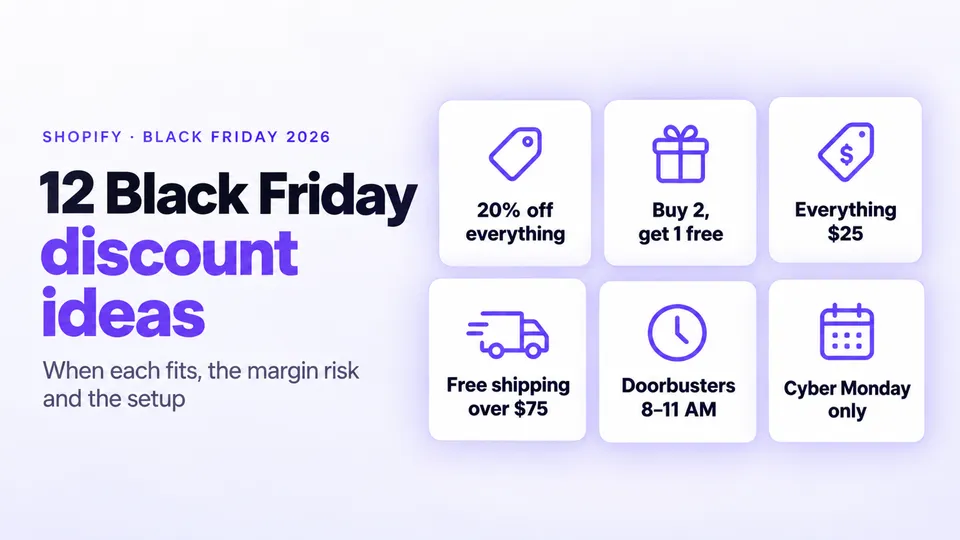
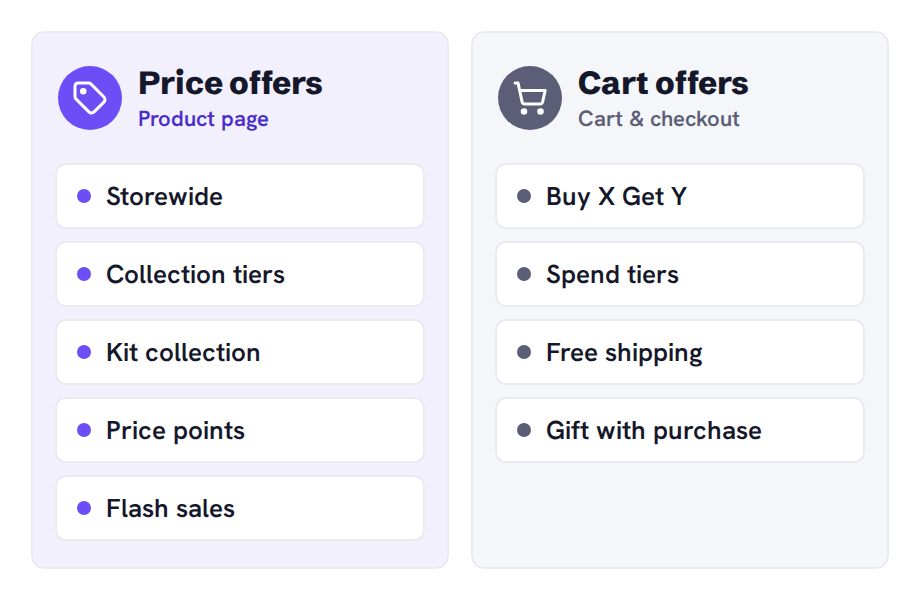
Good Shopify Black Friday discount ideas fit your margins and stock, not the loudest number on the street. Seven of the 12 cut the price: a storewide sale, collection tiers, a kit, price points, doorbusters, rolling flash sales and a Cyber Monday-only collection. Four apply in the cart: Buy X Get Y, spend tiers, free shipping and a gift with purchase. Early access lets your list shop first.
Black Friday 2026 is November 27. We make Disco, the sale app in the how-to steps.
In this guide
- Which storewide and collection sales work for Black Friday?
- What are good Shopify Black Friday flash sale ideas?
- What should a Shopify Cyber Monday flash sale offer?
- Which Black Friday offers raise order value?
- Which Black Friday offer fits your store type?
- When is a sale app better than Shopify discounts?
- What are good Shopify Black Friday announcement bar examples?
- Shopify Black Friday discount ideas FAQ
- When should you set up your Black Friday offers?
Which storewide and collection sales work for Black Friday?
Start with a storewide percentage, tiered collections, a discounted kit or fixed price points. Disco schedules these as sale prices on product and collection pages without a code, then restores the original prices when the sale ends. To let your email list shop first, give subscribers a code instead.
1. Storewide percentage off
A storewide "20% off everything" fits when margins are healthy. The margin risk is high, because bestsellers get discounted too. At 20% off, a $40 product that costs $20 drops from $20 profit to $12.
In Shopify you can use an automatic Amount off orders discount, but it shows savings only in the cart. Disco resolves this by displaying the sale price, with the original struck through, on product and collection pages.
How to set up 20% off everything in Disco
- Click Create sale, then choose Same discount and Percentage: 20.
- Choose All products under Include products, then set the Active dates.
- Exclude bestsellers under Exclude products / collections (Lite and up).
2. Tiered discounts across 2–3 collections
When margins differ by collection or stock age, tier the sale: 15% off new arrivals, 25% off core lines and 40% off last season. The margin risk is low to medium, because deep cuts go where stock must move.
In Shopify you can set one automatic discount per collection to combine with other Product discounts, but the savings show only in the cart. Disco resolves this by displaying each collection's tier as a struck-through price.
How to tier discounts across collections in Disco
- Create one Same discount campaign per collection (three need Lite).
- Give each campaign its collection and percentage.
- Give all three the same Active dates.
3. A discounted kit collection
If products sell together, such as a grinder and beans, make them a discounted kit collection. The margin risk is medium, because shoppers can still buy the cheapest piece alone. A true bundle, one product at one price, needs an app such as Shopify Bundles.
In Shopify you can give the kit collection an automatic discount, but the saving shows only in the cart. Disco resolves this by showing sale prices on product pages and building the collection for you.
How to build a discounted kit collection in Disco
- Click Create sale and select the kit's products.
- Enter the kit name as the Title.
- Use Create collection to build the kit collection under that name.
4. Fixed price points
Gift shoppers often think in budgets, so try one price such as "everything $25" for accessories with similar costs. The margin risk is uneven, because one price can push some products below cost.
In Shopify you can bulk-edit Price and Compare-at price (sale pricing), but you change them back by hand. Disco resolves this by restoring the original prices when the sale ends.
How to set a fixed price point in Disco
- Click Create sale, choose New price and enter 25.
- Select the accessories and set the Active dates.
- Exclude products where $25 is below cost under Exclude products / collections (Lite and up).
5. Early access for your list
If you have an email list, or time to grow one, let subscribers shop a few days early. The margin risk is low if the early offer is lighter than the public one.
Shopify and Disco do different jobs here. The early offer is a Shopify discount code limited to Customer segments, with active dates, because Disco's sale prices show to everyone. Disco builds the list before the sale.
Your loyalty members are a ready-made early-access list. For BFCM, you can use Flits loyalty program. You can group shoppers by points, spend, or orders, so you know who your best customers are before the sale starts. Email your top tier first, then open the offer to everyone else.
How to collect an early-access list in Disco
- Create the public sale with its Active dates.
- Turn on Show before the sale starts (Lite and up). The bar collects email addresses.
What are good Shopify Black Friday flash sale ideas?
Good Shopify Black Friday flash sale ideas are short, deep offers on a few products with a real end time. Two work well: doorbuster hours on hero products, and rolling sales across collections. Schedule each in Disco with exact Active dates and a countdown timer on the product page.
Where two Disco sales cover a product, the higher discount applies. A Shopify automatic discount still applies on top of a Disco price.
6. Doorbuster hours
If you hold deep stock of 3–5 hero products, cut them hard for a few hours, such as 8 AM to 11 AM on Friday. The margin risk is high per unit, but the stock and hours cap it.
In Shopify you can schedule an Amount off products discount, but its settings have no countdown timer. Disco resolves this with a timer shown only while the sale runs, and prices go back at 11 AM on their own.
How to run doorbuster hours in Disco
- Set the Active dates from 8 AM to 11 AM on Friday.
- Turn on Show countdown timer on product page.
7. Rolling collection flash sales
If your catalog is broad, put one collection on sale after another, so shoppers keep checking back. The margin risk is lower than storewide, because each collection is discounted briefly.
In Shopify you can create one automatic discount per window, but each shows savings only in the cart. Disco resolves this by showing the sale price and a countdown on the product page.
How to rotate collection flash sales in Disco
- Create one campaign per collection (more than two need Lite).
- Set back-to-back Active dates for each.
- Turn on Show countdown timer on product page.
What should a Shopify Cyber Monday flash sale offer?
A Shopify Cyber Monday flash sale should offer something new, not a repeat of Friday. Put a held-back collection on sale for Monday only as its own Disco campaign, and say so in the bar. Friday's buyers then don't see their purchase undercut.
8. A Cyber Monday-only collection
Choose that collection, such as accessories or a gift range, before Friday. The margin risk is medium if you keep the depth at or below Friday's.
In Shopify you can put an Amount off products discount on that collection, but the savings appear only in the cart. Disco resolves this by showing Monday's sale prices on product pages until the campaign ends.
How to set up a Cyber Monday-only collection in Disco
- Create a separate campaign for the collection.
- Set Monday-only Active dates, as the scheduling guide shows.
- Turn on Show countdown timer on product page.
Which Black Friday offers raise order value?
Buy X Get Y, spend tiers, free shipping and gifts with purchase raise order value. They apply in the cart, so pair them with a price offer. Cart offers stack on sale prices. Two Shopify discounts add up only when set to combine.
9. Buy X Get Y
Buy X Get Y suits consumables and multiples, such as "buy 2 candles, get a third free." The margin risk is medium: buy one, get one free is half off both items.
Set it up in Shopify: a Buy X get Y discount. Set Customer buys and Customer gets, with the value at Free or a percentage.
10. Spend more, save more
If average orders sit just under a round number, tiers such as "$10 off $75, $25 off $150" give shoppers a reason to add more. The margin risk is medium, because the cut applies on top of any sale prices.
Set it up in Shopify: one Amount off orders automatic discount per tier, each with a Minimum purchase amount. With combinations off, the best tier applies.
11. Free shipping over a threshold
If shipping costs put shoppers off at checkout, offer free shipping over a threshold. The margin risk is the shipping you pay, so set the threshold above your average order value.
Set it up in Shopify: an automatic Free shipping discount with a Minimum purchase amount.
12. Gift with purchase
If you'd rather not cut prices, offer a low-cost gift shoppers value, such as samples or a tote, "free with orders over $100." The margin risk is low if the gift is cheap.
Set it up in Shopify: a Buy X get Y discount with the gift at Free. Shoppers must add the gift to the cart themselves; adding it automatically needs a gift-with-purchase app.
Which Black Friday offer fits your store type?
Match the offer to what you sell and its margin. Consumables suit Buy X Get Y and kits. Seasonal fashion fits collection tiers. Thin-margin electronics suit free shipping or a few doorbusters. Small-batch stores can skip deep cuts and offer early access.
| Store type | Start with | Why |
|---|---|---|
| Fashion and apparel | Tiered collections (2), rolling flash sales (7) | Last season can go deep while new arrivals stay shallow |
| Beauty and skincare | Buy X Get Y (9), gift with purchase (12) | Refills and samples cost little and bring shoppers back |
| Coffee, food and drink | Kit collection (3), spend more, save more (10) | Products go together, so baskets grow easily |
| Home and gifts | Fixed price points (4), Cyber Monday-only collection (8) | Gift shoppers browse by budget |
| Electronics and accessories | Doorbuster hours (6), free shipping threshold (11) | Thin margins, so keep deep cuts to a few products |
| Handmade or small batch | Early access (5), gift with purchase (12) | Limited stock goes to loyal buyers without deep cuts |
| Large catalog, many brands | Storewide (1) with exclusions, rolling flash sales (7) | One message, with low-margin lines left out |
When is a sale app better than Shopify discounts?
A sale app is better when shoppers should see the sale price, with the original struck through, on product and collection pages. Disco writes that price and restores the original when the sale ends. For cart offers, or savings shown only in the cart, Shopify's discounts are enough.
| Need | Shopify on its own | Disco |
|---|---|---|
| Sale price with the original struck through on product and collection pages | Bulk-edit Price and Compare-at price, then change them back after the sale. A discount needs a third-party app for this | Writes both at the start date and puts them back at the end |
| Start and end on a schedule | Automatic discounts have active dates, but show only in the cart and at checkout | Starts and ends the sale on its own at the Active dates |
| Countdown timer on the product page | Not part of Shopify's discount settings | Show countdown timer on product page |
| Announcement bar | Theme bar, changed by hand at each phase | Show before the sale starts and Show while the sale is active (Lite and up) follow the campaign dates |
| Discount codes on sale items | A code applies on top of a sale price | Block discount codes on sale products (Business plan) |
What are good Shopify Black Friday announcement bar examples?
Good Shopify Black Friday announcement bar examples fit a phone screen and state the offer or a real deadline. This one does both: "Doorbusters until 11 AM ET: 40% off five bestsellers." Write a line for each phase: a teaser, the launch, the last hours and Cyber Monday. Disco's bar updates automatically on the campaign's dates.
Teaser
- Black Friday starts Friday, November 27. Get notified first.
- Our biggest sale of the year opens in 3 days.
- Black Friday preview: 25% off outerwear from November 27.
Launch
- Black Friday is live: 25% off everything, no code needed.
- 20% off coffee, 30% off brewing gear. Prices already reduced.
- Doorbusters until 11 AM ET: 40% off five bestsellers.
Last hours
- Last hours: Black Friday prices end tonight at 11:59 PM ET.
- Final day of our Black Friday sale. Ends 11:59 PM ET.
- 6 hours left at 25% off. Then prices go back.
Cyber Monday
- Cyber Monday only: 30% off accessories until 11:59 PM ET.
- New for Cyber Monday: the gift shop at 20% off, today only.
- Last day of Cyber Week deals. Everything ends at 11:59 PM ET.
In Shopify you can edit the theme's Announcement bar, but only by hand in the theme editor, at each phase. Disco resolves this with two bar states that follow the campaign's dates.
How to schedule your announcement bar in Disco
- Turn on Show before the sale starts (Lite and up) for the teaser.
- Turn on Show while the sale is active for the launch, with Show countdown timer in announcement (Lite and up).
- Change the line for the last hours with Edit Promotional widgets or End date only, which keeps the sale running.
Every deadline in the bar matches the timer, the emails and the real end of the sale.
Shopify Black Friday discount ideas FAQ
What are the best Shopify Black Friday discount ideas for a small store?
Offers that protect margin: a few doorbusters, a kit collection or a gift with purchase. These Shopify Black Friday discount ideas keep deep cuts to the products you choose instead of the whole catalog.
How deep should a Shopify Black Friday flash sale go?
Only as deep as each product's cost allows. At 40% off, a $40 product that costs $20 still makes $4 a unit; at 50% off, it makes nothing.
How do I set up a Shopify Cyber Monday flash sale?
Run a separate Disco campaign on one collection with Active dates from 12:00 AM to 11:59 PM on November 30. A Shopify automatic discount with the same dates also works, but shows the saving only in the cart.
Can I copy these Shopify Black Friday announcement bar examples as they are?
Yes, once you change the offer, dates and time zone to match your campaign.
Can a sale price and a discount code apply to the same product?
Yes. A sale price isn't a discount, so Shopify's combination settings won't stop a code applying on top; pause those codes or turn on Disco's Block discount codes on sale products on the Business plan (how it works).
When should you set up your Black Friday offers?
Before November, so there's time to test. Pick two or three of these ideas, work out the margin on each, and set them up. Disco schedules the price offers and puts every price back when they end. The setup guide walks through it.
Schedule your Black Friday sale with Disco.
Next: The 2026 BFCM playbook turns your offer into a dated plan, and our stacking guide keeps a sale price and a code from adding up.