

The best discount apps for Black Friday on Shopify do two jobs: change prices on time and make shoppers notice. They also stop discount codes stacking on the sale. We make Disco, our pick: the only one of the four whose listing has a sale page, and the cheapest for code blocking. GetSale fits EU stores and quantity breaks, Rockit the cheapest paid plan, Discounty the most offer types.
What are the best discount apps for Black Friday on Shopify?
Disco is our pick among the best discount apps for Black Friday on Shopify. It is the only one of the four whose listing has a sale page. Its code blocking is the cheapest, on Business (currently $25.99/month) against GetSale's Unlimited ($29.99/month), and its free plan has a countdown timer.
| Disco | GetSale | Rockit | Discounty | |
|---|---|---|---|---|
| Rating (reviews) | 4.8 (106) | 4.9 (331) | 5.0 (498) | 4.9 (1,281) |
| Sale price shown before checkout | Yes, with compare-at price | Yes, with compare-at price | Yes, with compare-at price | Yes, with compare-at price |
| Scheduled start and end, prices restored | Yes, free plan | Yes, free plan | Yes, free plan | Start and end time, free plan |
| Countdown timer | Free plan | Basic, $9.99/month | Free plan (1 timer) | Essential, $29.90/month |
| Announcement bar or banner | Lite, $9.99/month (hero banner on Professional) | Storefront banner, Basic, $9.99/month | — | Banners listed, no plan named |
| Sale badges | Lite, $9.99/month | — | Yes, no plan named | Free plan |
| Sale page | Professional, $17.99/month (coming soon, then live) | — | — | — (works with PageFly) |
| Blocks discount codes on sale items | Business, $25.99/month | Unlimited, $29.99/month | — (manual workaround) | — |
| Other offer types | — | Quantity breaks, tiered, mix-and-match | Volume discounts | Buy X get Y, BOGO, free gifts, quantity, cart goals, shipping |
| EU lowest-price tracking | — | Yes (Omnibus) | — | — |
| Free plan limit | 30 products (all variants), 2 campaigns | 75 variants, 3 campaigns | 50 variants | 10 variants, 3 campaigns |
| Cheapest plan with countdown, banner and code blocking | Business, $25.99/month | Unlimited, $29.99/month | None | None |
Ratings, plans and prices as of October 26, 2026, from each app's Shopify App Store listing, at regular monthly prices (some listings show a first-month offer). A dash means the feature isn't on the app's listing.
What does a Black Friday discount app need to do?
A Black Friday discount app has two jobs: change prices on time and restore them when the sale ends, and make shoppers notice the sale with a countdown timer, a banner, sale badges and a sale page. It also needs to stop discount codes from stacking on the sale price. Most discount apps only do the first job.
All four apps can schedule the price change for the whole sale, from Black Friday, November 27, 2026, to Cyber Monday, November 30, 2026. They split on job 2: Disco runs the countdown, announcement bar, badges, hero banner and sale page in one campaign; GetSale has a timer and a storefront banner; Rockit a timer and badges; Discounty badges, plus a timer from Essential.
Can you run a Shopify Black Friday discount without an app?
Partly: Shopify's built-in tools cover only part of the first job. Disco schedules real sale prices with the compare-at price, restores them when the sale ends, and runs the countdown, banners, badges and sale page in the same campaign. A built-in Shopify Black Friday discount makes you choose between showing the price before checkout and having an end date.
| Built-in option | What shoppers see | When it ends |
|---|---|---|
| Automatic discount or discount code with Active dates | The saving in the cart and at checkout only | At its end date |
| Bulk-edit Price and Compare-at price | The sale price with the original struck through | When you change every price back by hand |
| Your theme's announcement bar (some themes have one) | A text message at the top of every page | When you hide it: no schedule, no countdown |
In Shopify you can schedule an automatic discount under Discounts > Create discount with Active dates, but the Shopify Help Center states that showing crossed-out savings on product and collection pages needs a third-party app. Disco resolves this by writing the sale and compare-at prices on schedule and restoring them at the end.
If a saving at checkout is all you need, the built-in discount is enough; see why automatic discounts show only at checkout.
What does the full Black Friday kit cost on each app?
The full Black Friday kit (a countdown timer, a banner and discount code blocking) currently costs $25.99/month on Disco's Business plan and $29.99/month on GetSale's Unlimited plan. Rockit and Discounty do not list discount code blocking on any plan, so neither offers all three on a single plan.
| App | Countdown timer from | Banner from | Code blocking from | Full kit |
|---|---|---|---|---|
| Disco | Starter (free) | Lite, $9.99/month | Business, $25.99/month | Business, $25.99/month |
| GetSale | Basic, $9.99/month | Basic, $9.99/month | Unlimited, $29.99/month | Unlimited, $29.99/month |
| Rockit | Free plan | — | — | Not on any plan |
| Discounty | Essential, $29.90/month | No plan named | — | Not on any plan |
Disco's Business plan also includes the sale page, sale badges and the hero banner.
Is Disco good for Black Friday?
Yes. Disco puts the price change, the promotion and code blocking in one campaign. It is the only app of the four whose listing has a sale page (coming soon with email signup, then live). Its code blocking, on Business (currently $25.99/month), is the cheapest, and its free Starter plan has a countdown timer.
Disco is Built for Shopify, holds 4.8 stars from 106 reviews and has been on the Shopify App Store since August 2019. Each plan's limit counts products with all their variants (see pricing):
- Starter (free): scheduling, countdown timer, sale collection, up to 30 products.
- Lite (currently $9.99/month): announcement bar, sale badges, exclusion rules, up to 300 products.
- Professional (currently $17.99/month): sale page, hero banner, up to 1,500 products.
- Business (currently $25.99/month): discount code blocking, up to 7,500 products.
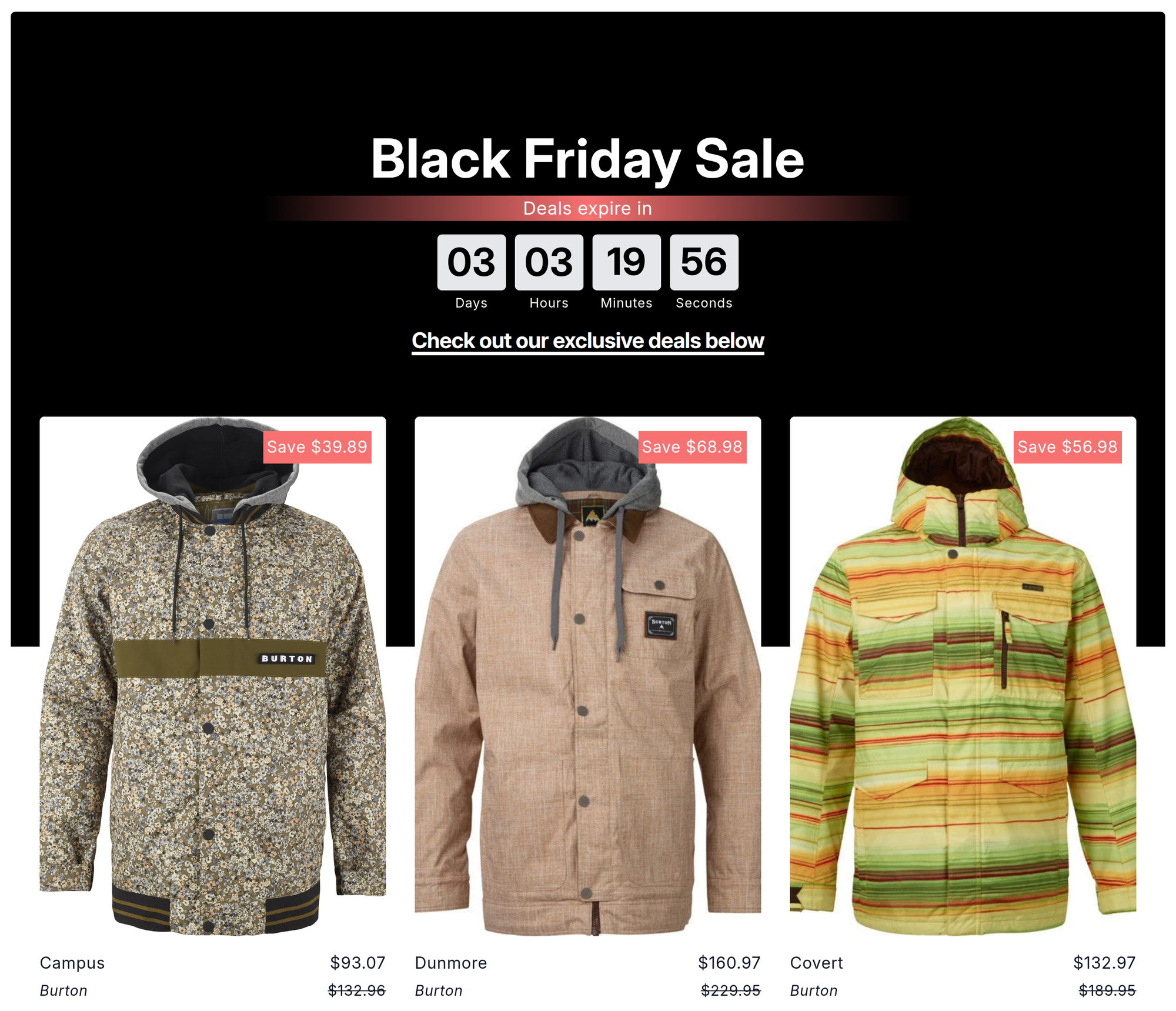
The sale page: one URL in two modes. Saving the sale puts up the coming soon page, which can collect emails into Shopify Customers, tagged newsletter, disco and the sale's name. When the sale starts, it becomes the live sale page, and it comes down when the sale ends.
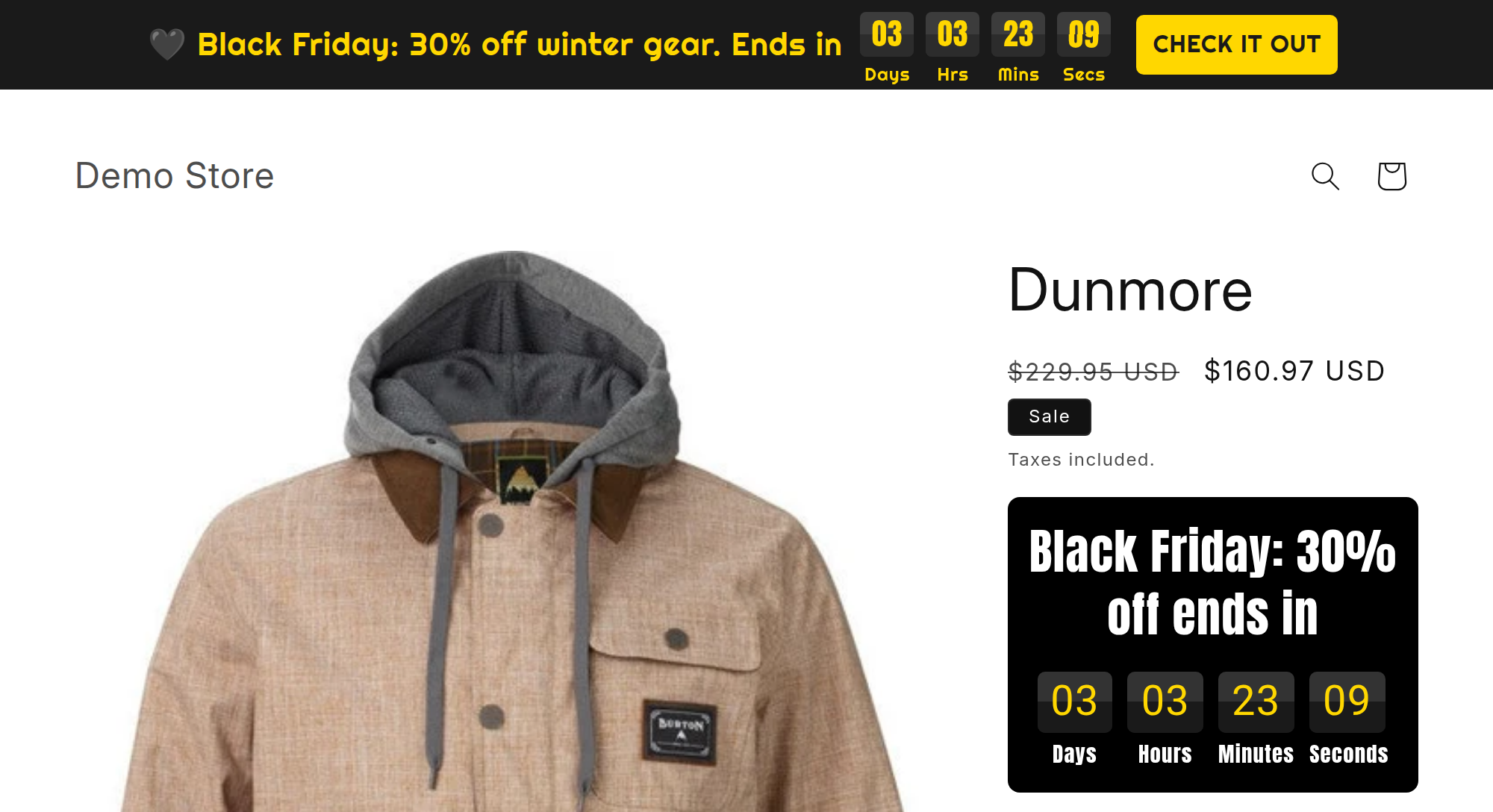
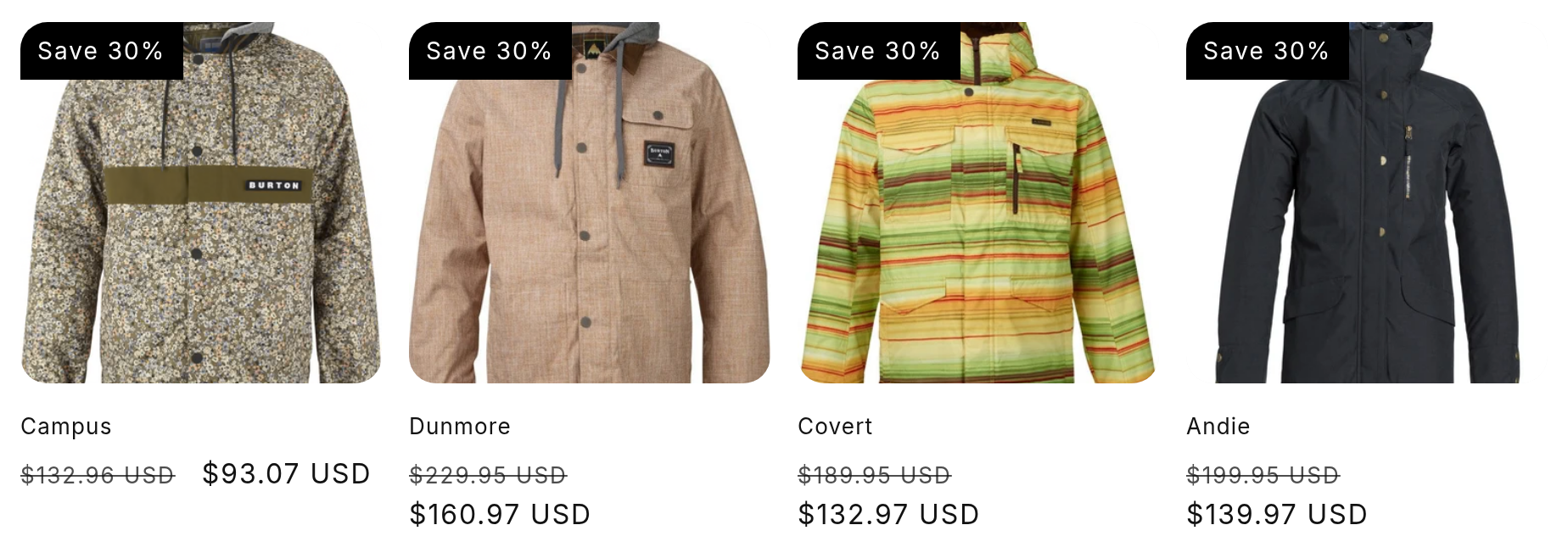
What shoppers see: the bar on every page, badges on product images, and the countdown by the sale price.
Where it falls short: Disco does not do quantity breaks or buy X get Y. It changes product prices, not checkout offers.
Used this app during Black Friday sale. It was very easy to use and had great features! Support was also very helpful. Will definitely use again for bulk discounts on the site
— Gemma Azzurro, Shopify App Store, December 6, 2024
Best for: stores that want the sale, its promotion and code blocking in one campaign.
How to set up your Black Friday sale in Disco
- Create the sale. Click Create sale, then Same discount.
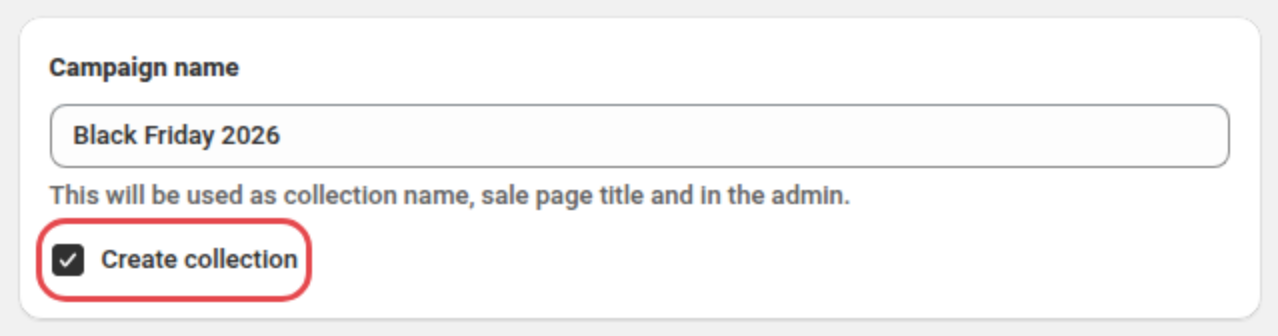
- Name it. In the Campaign name card, enter "Black Friday 2026" and tick Create collection.
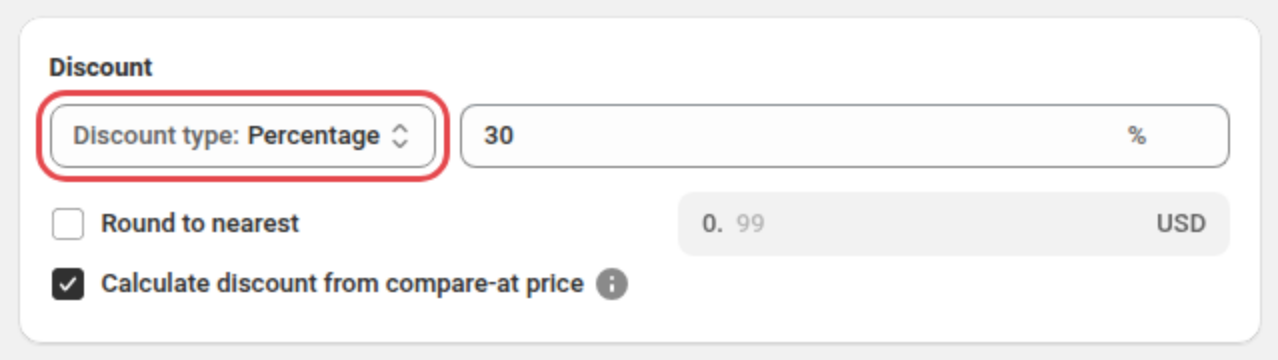
- Set the discount. Choose Percentage and enter 30.
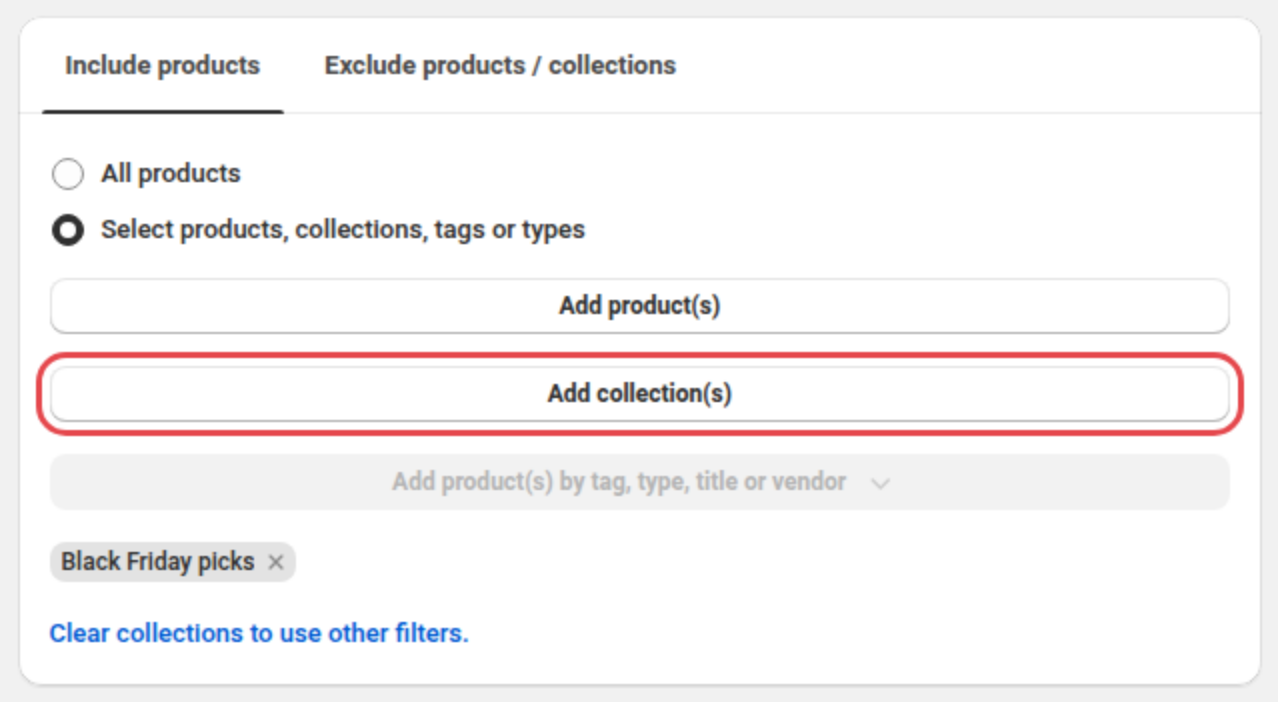
- Pick the products. On the Include products tab, choose Select products, collections, tags or types and click Add collection(s) to add your Black Friday collection, or choose All products.
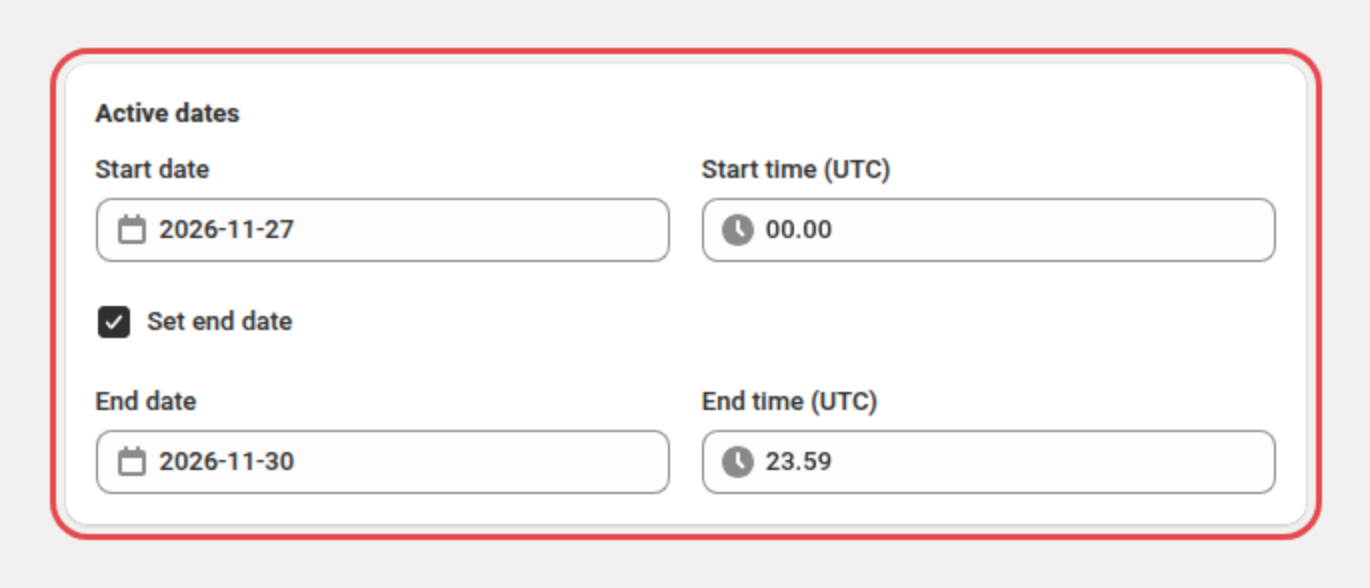
- Schedule it. In Active dates, set Start date and Start time to November 27, 2026, 12:00 AM, tick Set end date, and set End date and End time to November 30, 2026, 11:59 PM. See how to schedule a sale.
- Block codes. Tick Block discount codes on sale products (Business plan), then click Next.
- Add the countdown. In the Countdown timers card, tick Show countdown timer on product page (Starter). See how to add a countdown timer.

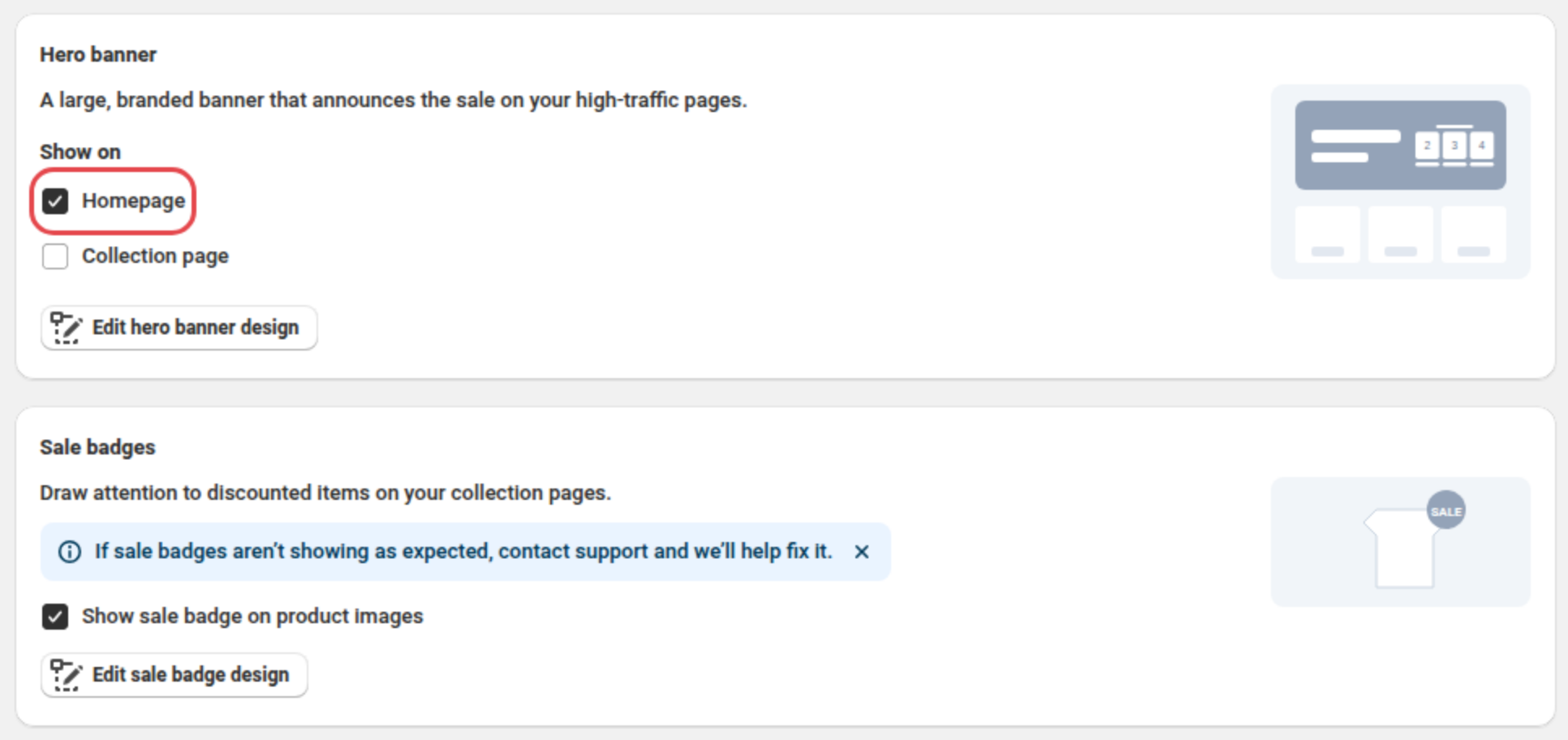
- Add the hero banner and badges. In the Hero banner card, tick Homepage under Show on (Professional). In the Sale badges card, tick the badge checkbox (Lite).
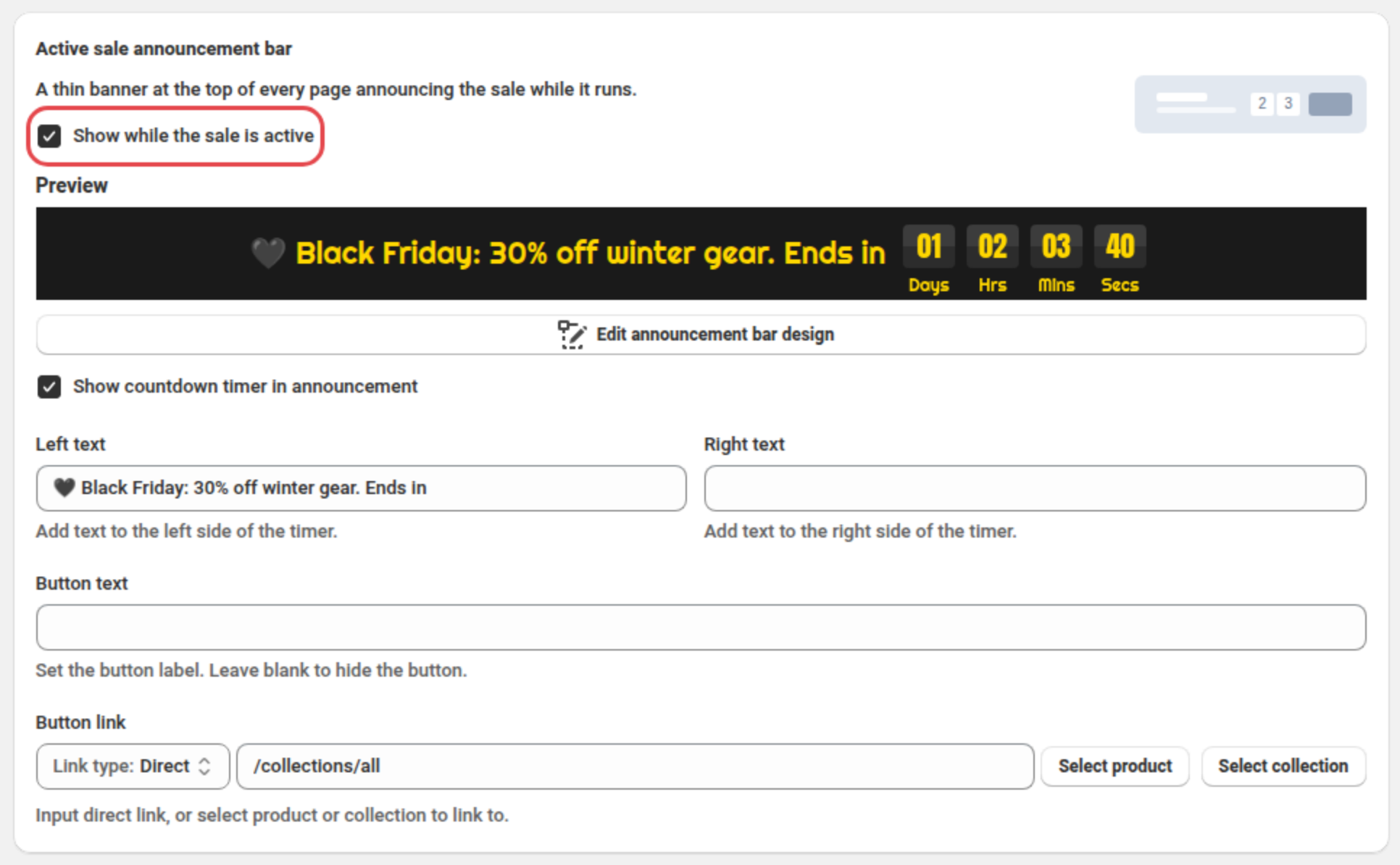
- Add the announcement bar. Tick Show while the sale is active and Show countdown timer in announcement, then write your message in Left text (Lite).
- Move on to the sale page. Click Next.
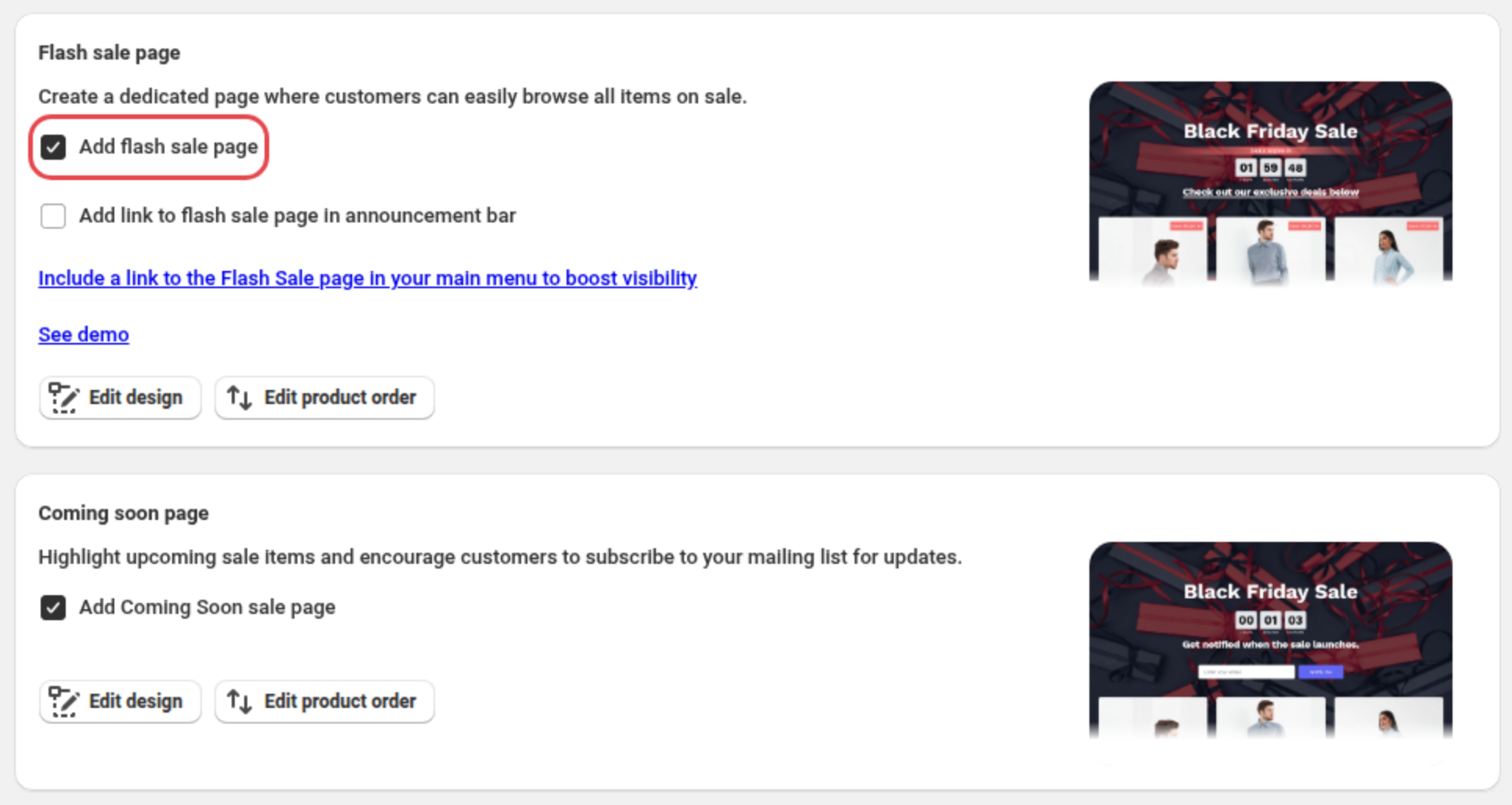
- Add the sale page. In the Flash sale page card, tick Add flash sale page, and in the Coming soon page card, tick Add Coming Soon sale page (Professional).
- Save. Click Save. The coming soon page goes up at once and switches to the live sale on November 27.
- Place the hero banner. If your homepage doesn't have it yet, add the Disco Hero Banner app block in the theme editor. See how to add the hero banner to your theme.
From November 27, shoppers see the live sale page:
Is GetSale good for Black Friday?
Yes, especially for EU stores and stores that run quantity breaks. GetSale schedules sale prices with the compare-at price and reverts them automatically. It adds a countdown timer and a storefront banner from Basic (currently $9.99/month) and blocks discount codes on Unlimited ($29.99/month). Its listing has no sale page or sale badges.
GetSale Bulk Discounts & Sales is Built for Shopify, on the App Store since October 2019, with 4.9 stars from 331 reviews. Its free plan covers 75 variants and 3 campaigns. Standard (currently $19.99/month) lets you customize the timers, banners and quantity breaks widget, and Unlimited adds market-specific discounts. EU stores can add Omnibus lowest-price tracking; see showing your lowest price from the last 30 days.
Where it falls short: no sale page or sale badges on its listing, and code blocking is only on Unlimited.
Best for: EU lowest-price tracking, quantity breaks or market-specific discounts.
Is Rockit good for Black Friday?
Yes, if you want the cheapest paid plan or a free countdown timer on a small catalog. Rockit's Starter plan is currently $7.99/month for 2,000 variants, and its free plan includes 1 countdown timer for 50 variants. Its listing includes sale and discount badges, but no banner, sale page or built-in code blocking.
Rockit Discounts & Sales App is Built for Shopify, launched in November 2023, with 5.0 stars from 498 reviews. The free plan adds 1 volume discount and automatic sale resets; Starter includes 5 timers, Plus (currently $12.99/month) 20,000 variants and Professional (currently $29.99/month) unlimited.
Where it falls short: for discount codes, its admin shows only a manual workaround: an automated "Not on sale" collection with the compare-at price empty, and every code restricted to it. Without it, a 10% code applied on top of the sale price in our own setup on October 21.
Best for: the cheapest paid plan or a free timer on a small catalog.
Is Discounty good for Black Friday?
Yes, when your Black Friday promotion goes beyond sale prices. Discounty has the most offer types of the four, including buy X get Y, BOGO, free gifts, quantity discounts, cart goals and shipping discounts. It also has the most reviews (1,281). Its countdown timer starts on Essential (currently $29.90/month), and it lists no code blocking.
Discounty: Bulk Discount Sales is Built for Shopify, launched in October 2022, with 4.9 stars from 1,281 reviews. Free Starter covers 10 variants and 3 campaigns with sale badges, quantity and cart goal discounts; Lite (currently $9.90/month, 150 variants) adds buy X get Y, BOGO, free gifts and shipping discounts. For sale pages, it integrates with the PageFly landing page builder, a separate app.
Where it falls short: a 10-variant free plan, no sale page of its own, no code blocking listed, and a 10% code stacked on the sale price in our own setup on October 21.
Best for: buy X get Y, quantity breaks, cart goals or shipping offers next to the sale.
Can you stop discount codes stacking on Black Friday sale prices?
Yes. In Disco, tick Block discount codes on sale products (Business plan, currently $25.99/month), and checkout rejects any discount code while a sale item is in the cart. GetSale lists code blocking on its Unlimited plan ($29.99/month); Rockit and Discounty do not list built-in code blocking.
On Black Friday, a 10% welcome or influencer code applies to the sale price by default because the sale price is the product's Price to Shopify, not a discount. On a $100 jacket marked down 30% to $70, a 10% code takes another $7 off, leaving $63: 37% off instead of 30%.
In Shopify you can keep a code off sale items by setting its Applies to to an automated "Not on sale" collection where Compare at price is not set (the workaround Rockit's admin shows). But you restrict every code by hand, and a product still matches when any variant has no compare-at price (Shopify Help Center). Disco resolves this with one checkbox per sale.
How to block discount codes on sale items in Disco
- Open the sale. Click Create sale, or open your scheduled sale.
- Turn on the block. In the Discount code blocking card, tick Block discount codes on sale products (Business plan).

- Save. Click Next until the last page, then click Save.
- Test it once the sale is active. Try a code at checkout with a sale item in the cart. Shoppers see: "Discount codes can't be used with sale items in your cart."
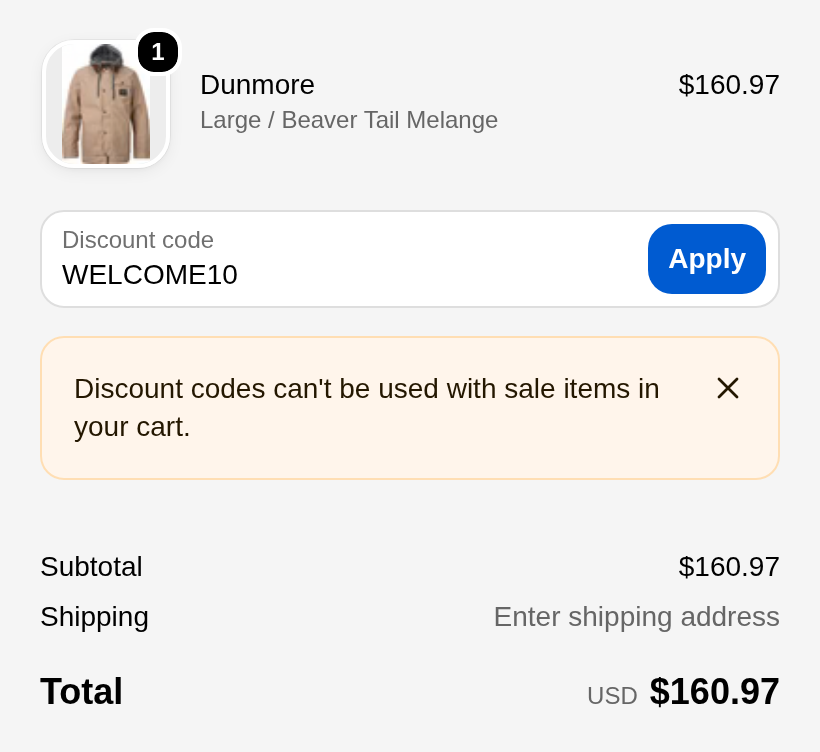
Any sale product in the cart blocks codes for the whole cart, full-price items included; codes other apps create as non-rejectable may still apply, so test each code source. See how to stop discount codes from stacking and Disco's help article.
What is the best free discount app for Shopify?
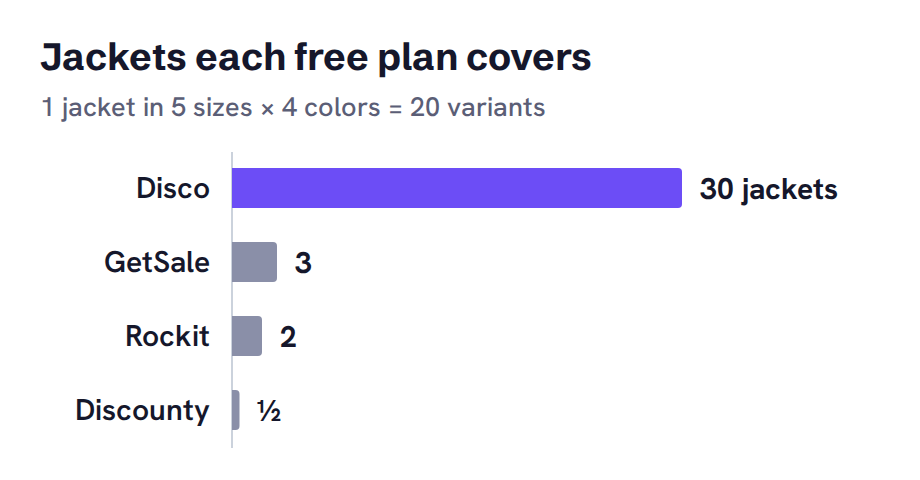
Disco is the best free discount app for Shopify when your products have about 3 or more variants each. Its free Starter plan counts 30 products with all their variants and includes scheduling, a countdown timer and a sale collection. When your products have only 1 or 2 variants, GetSale's 75-variant free plan covers more products.
| App | Free plan limit | Countdown timer on the free plan | Jackets in 5 sizes and 4 colors it covers |
|---|---|---|---|
| Disco | 30 products (all variants), 2 campaigns | Yes | 30 |
| GetSale | 75 variants, 3 campaigns | No (from Basic) | 3 |
| Rockit | 50 variants | Yes, 1 timer | 2 |
| Discounty | 10 variants, 3 campaigns | No (from Essential) | Half of one (10 of its 20 variants) |
A jacket in 5 sizes and 4 colors has 20 variants. GetSale's free plan also includes all discount types, Rockit's adds 1 volume discount and Discounty's includes sale badges, quantity and cart goal discounts.
Which app should you choose for Black Friday?
Choose Disco if you want the sale, the promotion layer and code blocking in one campaign, with a coming soon and live sale page. Choose GetSale for EU lowest-price tracking or quantity breaks, Rockit for the cheapest paid plan, or Discounty for buy X get Y and cart goals.
For more sale apps, such as Alpha and Bulk Price Editor Pro, see the best flash sale apps for Shopify.
FAQ
What are the best discount apps for Black Friday on Shopify?
Disco is our pick for a Black Friday sale that needs scheduled prices, a countdown, banners, badges, a sale page and code blocking in one campaign. GetSale fits EU Omnibus price tracking and quantity breaks, Rockit fits the cheapest paid plan and Discounty fits buy X get Y, cart goals and shipping offers.
What is the best free discount app for Shopify?
Disco is the best free discount app for Shopify when your products have about 3 or more variants each, because its free Starter plan covers 30 products with all their variants plus a countdown timer and scheduling. For products with 1 or 2 variants, GetSale's 75-variant free plan covers more items, and Rockit's 50-variant free plan also includes 1 countdown timer.
Can you run a Shopify Black Friday discount without an app?
You can schedule an automatic discount under Discounts > Create discount, which shows the saving only in the cart and at checkout, or bulk-edit Price and Compare-at price, which has no end date and must be restored by hand. Showing crossed-out sale prices on product and collection pages on a schedule needs a discount app.
Which Black Friday discount apps block discount codes on sale items?
Of the four apps compared here, Disco lists discount code blocking on its Business plan (currently $25.99/month) and GetSale lists it on its Unlimited plan ($29.99/month). Rockit shows a manual collection workaround in its admin, and Discounty does not list code blocking.
How do you get Disco's Black Friday deal?
Install Disco and enter code 30BFCM26 when you pick a paid plan, by November 29, 2026, 11:59 PM UTC. You get 30% off any paid plan for your first 3 months, then the plan renews at its regular price. See Black Friday Shopify app deals for other app offers.
Install Disco from the Shopify App Store →
Next: Black Friday Shopify app deals lists this year's app offers, and our BFCM apps guide covers the rest of your Black Friday setup.