

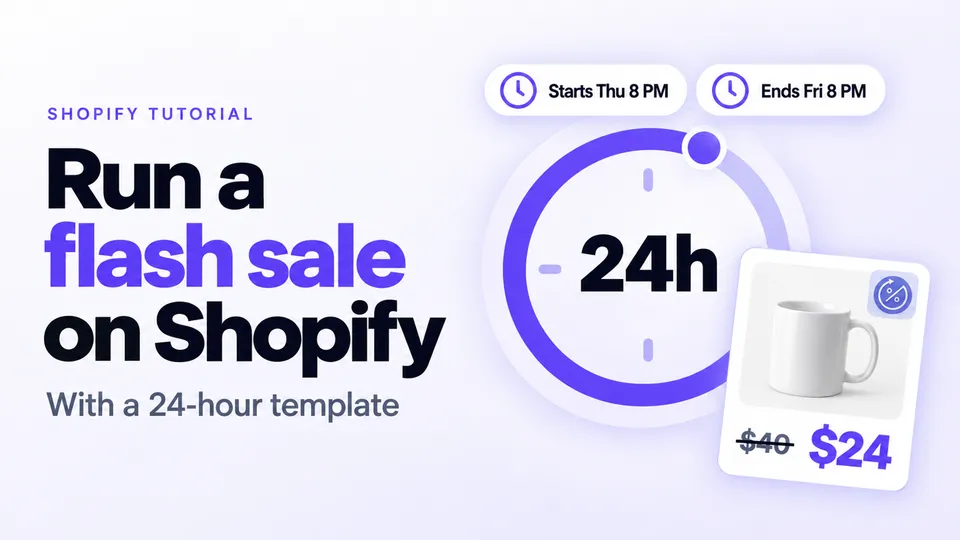
Here's how to run a flash sale on Shopify: choose a few products, cut them deeper than usual for a short window, tell your list first, and show a countdown until it ends. Disco schedules it as one sale with Active dates, changes the prices at the start and restores them at the end.
In this guide
Shopify flash sale vs sitewide sale: which should you run?
The Shopify flash sale vs sitewide sale choice comes down to your goal. Run a flash sale, a deep discount on a few products for hours, to move specific stock or win attention in a quiet week. Run a sitewide sale, a moderate discount across most of the catalog for several days, for volume in a seasonal moment.
| Flash sale | Sitewide sale | |
|---|---|---|
| Discount | Deep | Moderate |
| Products | A few, or one collection | Most or all of the catalog |
| Length | Hours, rarely more than a weekend | Several days |
| Goal | Urgency and attention | Volume and participation |
| Best for | Clearing a collection, spotlighting a hero product, giving your list a reason to open today | BFCM, end of season, a store anniversary |
| Risk | Shoppers learn to wait if you run them on a predictable schedule | Margin on every order, including products that would have sold anyway |
You can also run both. Build a sitewide seasonal sale with a short flash deal inside it to keep people coming back. Schedule them as separate sales with their own start and end times; where both cover a product, the higher saving applies. We explain this in the BFCM section below.
How long should a flash sale last?
Hours, not days. Shopify's flash sale guide says most flash sales last between 2 and 36 hours and gives a 24-hour sale as an example. Shopify also notes that shoppers need more than 1 hour to discover a deal and act. Start with 24 hours.
| Length | When it fits | Watch out for |
|---|---|---|
| A few hours | One hero product your list already wants; a doorbuster | Shoppers who don't open their email in time miss it |
| 24 hours | The default: a full day and evening, a launch email and a last call | Pick the start hour in the time zone most of your customers live in |
| Up to a weekend | Clearing a whole collection; customers spread across time zones | Urgency fades, and it starts to look like a regular sale |
In the same guide, Greg Merrell of Simplistic notes that there are no best-practice timetables because timing depends on the product and the customer. However, Shopify's scarcity guide warns that people may rebel against a deal if the window is too short.
Shopify notes that flash sales lose urgency if customers come to expect them. Vary the products and the timing instead of running one every Friday, so shoppers do not learn to wait for the next one.
How do you run a Shopify 24 hour flash sale?
To build a Shopify 24 hour flash sale, create one sale in Disco on a few products and set its Active dates exactly 24 hours apart. Switch on the countdown timer for every discounted product and email your list before it starts. Disco changes the prices at the start and restores them at the end.
In Shopify you can schedule an automatic discount (Discounts → Create discount → Amount off products, method Automatic discount, with Active dates), but Shopify discounts apply only in the cart and at checkout, and crossed-out prices on product and collection pages need a third-party app. Disco resolves this by writing the sale price, with the original as the compare-at price, on each product for the 24 hours.
How to run a flash sale in Disco
- Pick the products. Click Create sale, choose Same discount, and on the Include products tab use Select products, collections, tags or types. Select a handful of hero products or one collection you need to clear. Never discount the whole catalog. Leave items out with the Exclude products / collections tab (Lite plan and up).
- Set the discount depth. Choose Percentage, Amount off or New price, and Round to nearest for clean prices. Go deep: Shopify's flash sale guide says anywhere from 50% to 70% off. Work back from your margin. For example, a $40 product that costs you $16 leaves $8 at 40% off and $4 at 50% off, before shipping and fees. Pick products whose margin can take a deep cut.
- Name the sale. Disco uses the name for the sale collection, the sale page title and the admin.
- Set the duration in Active dates. Enter the exact start and end date and time, for example Thursday 8 PM to Friday 8 PM. Disco starts and ends the sale on its own. Until it starts, you can still change its products and discount. See our scheduling guide for the details.
- Decide on discount codes. Tick Block discount codes on sale products in the Discount code blocking card (Business plan) so a code can't land on top of the flash price. Codes another app creates as non-rejectable may still apply, so tick it on the one-product test sale in the template below too, and try a discount code at checkout. Read how stacking works.
- Tease it with the announcement bar. Turn on Show before the sale starts, with the Get notified! button to collect emails (Lite plan and up).
- Add the urgency. Turn on Show countdown timer on product page for a timer on every discounted product page (free Starter plan). Turn on the bar's Show while the sale is active and Show countdown timer in announcement (both Lite plan and up) for a timer in the bar. The timer counts down to the sale's real end, so the deadline you show is the one you keep.
- Add the sale pages. Turn on Add flash sale page and Add Coming Soon sale page (Professional plan and up). The coming soon page goes up when you save the sale. It collects emails until the start, then becomes the live flash sale page on the same URL. Collected emails land in Shopify Customers, tagged
newsletter,discoand the sale's name. Follow our teaser and waitlist guide. - Save it. The ending is automatic. At the end time Disco puts the prices back and hides the timer and bars. The flash sale page comes down.
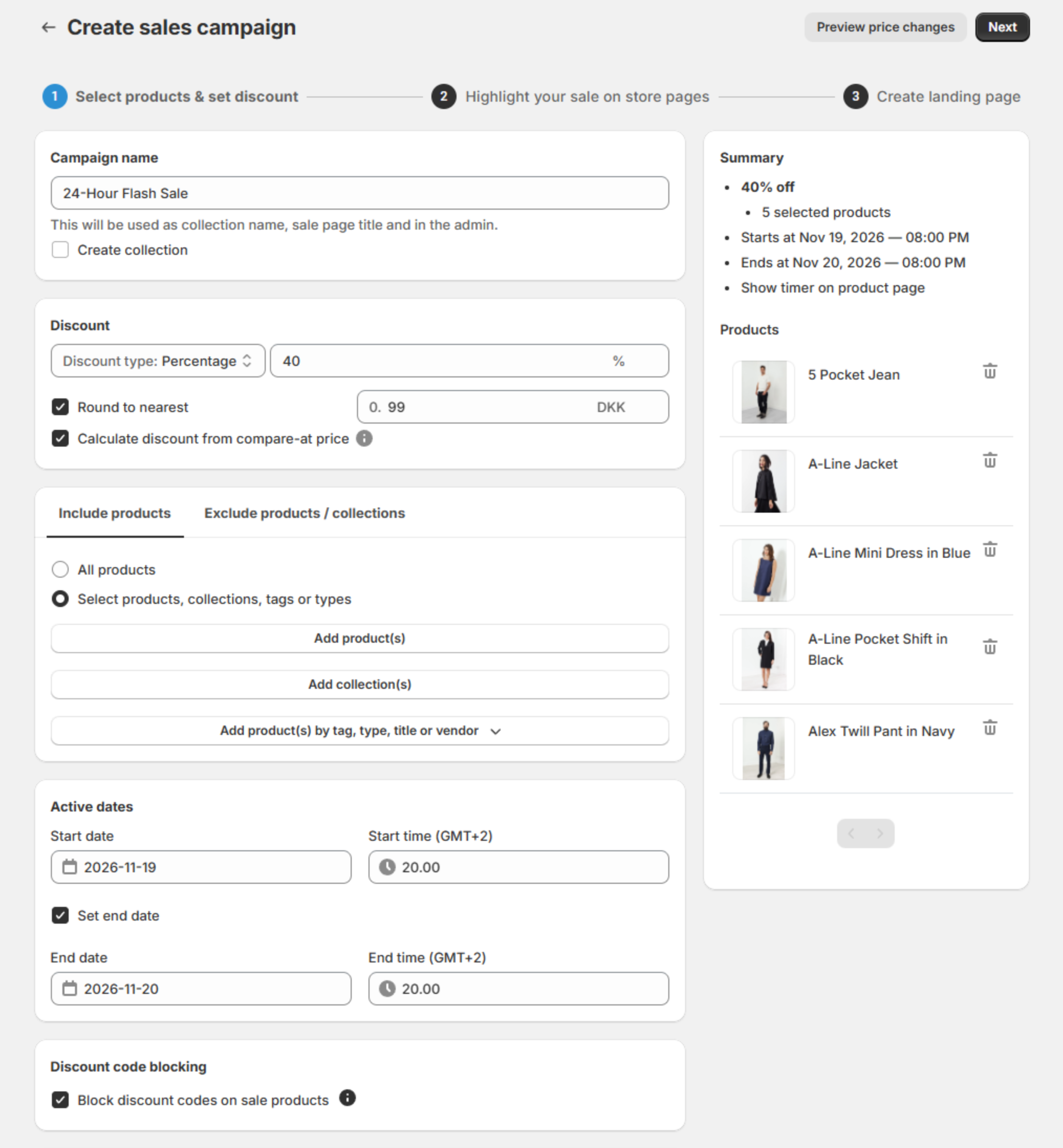
The free Starter plan covers scheduling and the product-page timer for up to 30 discounted products and 2 campaigns. The flash sale page starts on the Professional plan. Check our pricing or read the help document on Setting Up a Discount Campaign with Landing Page.
A 24-hour flash sale template
The example runs from Thursday 8 PM to Friday 8 PM in your store's time zone. Shift the hours, but keep the shape.
| When | What happens | Who |
|---|---|---|
| 7 days before | Run a one-product test sale that starts in 10 minutes and lasts 30, and watch it start and end. If you block codes, try a discount code at checkout during the test. | You, in Disco |
| 3 days before | Build the sale (steps 1–9) and save it: the teaser bar and coming soon page go up as soon as you save. First email to your list, linking the coming soon page: what, how deep, the start time. | You, in Disco; your email tool |
| The day before | Reminder email and a social post with the start time. | You |
| Thursday 8 PM | Sale starts: prices change, a timer appears on every discounted product page, the bar switches to the live message, the flash sale page goes live. | Disco, automatically |
| Thursday 8:05 PM | Check one product page, then send the launch email: the waitlist first, then everyone. | You |
| Friday 8 AM | Halfway email: 12 hours left. | You |
| Friday 4 PM | Last call: "Ends tonight at 8 PM." | You |
| Friday 8 PM | Sale ends: prices restored; timer, bars and flash sale page gone. | Disco, automatically |
| Friday 9 PM | Post-sale check (next section). | You |
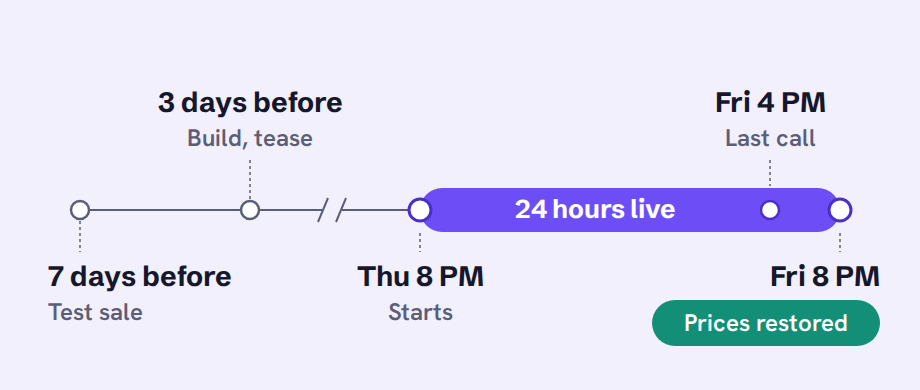
Most stores can run this template as it is. Shopify's Help Center page on flash sales keeps special preparation (private mode, a simpler theme, checking that apps and payment providers can take the volume) for sales where tens of thousands of customers start checkout within a few minutes.
What should you check when the flash sale ends?
When the end time passes, Disco restores the prices saved before the sale and hides the countdown timer, announcement bar and sale badges, and the flash sale page comes down. Within the hour, check 3 products, the sale URL and a test checkout, and keep the deadline. Do not extend it.
- Open 3 sale products in a private window: original price, no strikethrough, no timer or badge.
- Open the sale page URL: it should no longer show the live sale.
- Try a discount code at checkout if you blocked codes: codes work again once the sale has ended.
- If a price is wrong, check other apps first: price-syncing apps can rewrite the same fields, so read why sale prices revert to check your syncs.
Disco restores the price saved before the discount was first applied, overwriting any manual price changes made during the sale.
You can move the end of a running sale with What do you need to edit? → Edit Promotional widgets or End date only, but extending a flash sale teaches shoppers that your deadlines are decoration.
How do you fit a flash sale into the BFCM weekend?
Keep your sitewide sale running from Black Friday, November 27, to Cyber Monday, November 30, 2026, and add short flash sales on a few products inside it. In Disco each one is its own sale. Where two sales cover a product, the one with the higher saving applies.
In Shopify you can schedule a second automatic discount for the flash hours, but shoppers again see either saving only in the cart and at checkout. Disco resolves this by showing the deeper flash price on the product page, with the original struck through.
How to add a flash sale to your BFCM sale in Disco
- Build the sitewide sale with Active dates from Friday, November 27, 12:00 AM to Monday, November 30, 11:59 PM.
- Create the flash sale on a few products with a deeper discount and a few hours of Active dates inside the weekend. The higher saving applies. When it ends, products go back to the sitewide sale's price and widgets.
- Put the countdown timer on the flash sale: when two sales with widgets cover the same product, the widgets of the sale that started last apply.
The free Starter plan allows 2 campaigns and up to 30 discounted products. A sitewide sale on a larger catalog, or more than one flash sale, needs Lite (300 products, 10 campaigns) or higher: see pricing. Doorbuster hours and rolling collection flash sales are in our Black Friday discount ideas.
FAQ
How do you run a flash sale on Shopify for free?
Disco's free Starter plan schedules sales and shows the product-page countdown timer for up to 30 discounted products and 2 campaigns. The flash sale page starts on the Professional plan.
How long should a flash sale last on Shopify?
Hours rather than days: Shopify says most flash sales last between 2 and 36 hours, and 24 hours is a good starting point.
Can a Shopify 24 hour flash sale run on a single product?
Yes: select just that product on Include products, and the timer shows on its product page while the sale runs.
Shopify flash sale vs sitewide sale: which is better for clearing stock?
Run a flash sale on the collection you need to clear. A sitewide sale also discounts products that would sell anyway.
Can customers use a discount code on top of a flash sale price?
Not if you tick Block discount codes on sale products (Business plan), which stops codes on any cart with a sale product, though codes other apps create as non-rejectable may still apply. Automatic discounts are not blocked, so restrict those to a smart collection with the condition "compare-at price is empty" (help doc).
When should you set up your flash sale?
Run a one-product test sale a week before, then build and save the real sale 3 days before it starts, so the teaser runs 3 days. Install Disco now for the test, and let the start and end times change and restore the prices on their own.
Install Disco from the Shopify App Store →
Next: From teaser to flash sale: build a Shopify sale page with a waitlist, timer, and announcement bar builds the run-up in detail, and Shopify Black Friday discount ideas has flash sale ideas for the BFCM weekend.